Network Layer:
Bandwidth and Queue of the Router:
How to decide which source will be allowed to first input data packets in Queue router, to solve this we have three strategies
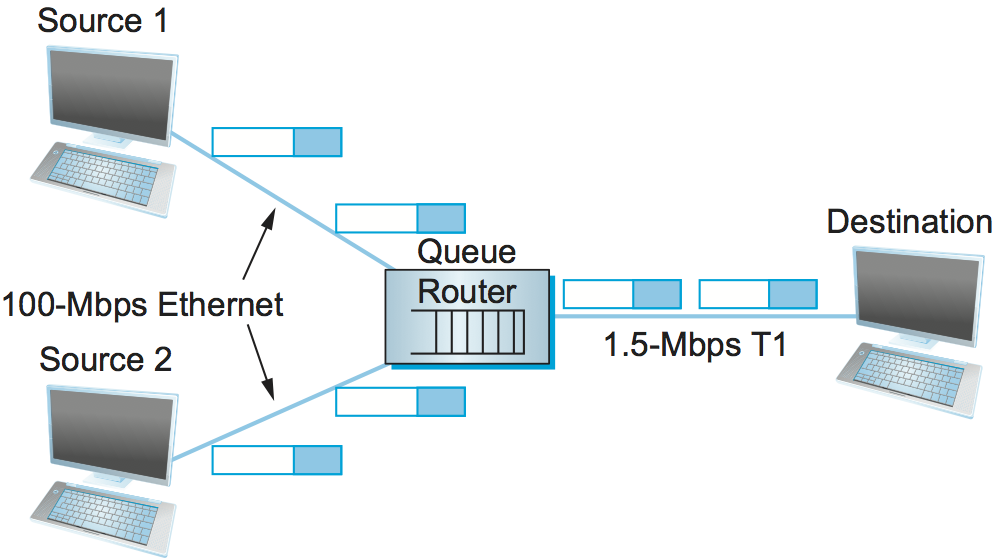
- First in First out: Which ever data packet is first received by the Queue router will be sent on the output link. This approach does not work as different data packages have different sizes.
- Priority Queue: Which ever data packet has more priority than the other will be sent on the output link.
- Fair Queuing: Each source receives a time slice to send it’s packet, for example source 1 and source 2 both have a time slice of a min.
IP Header:
IP header is the peace of information that is inserted by the IP layer while sending the network packet to the remote peer.
- For a received message from the peer, the IP layer removes the header. The header information works as a piece of control information for the user data.
- Mainly the IP header does end to end routing and ensures the quality of service.

The IP packet format consists of these fields:
- Version field (4 bits) indicates the version of IP currently used.
- IP Header Length (IHL) field (4 bits) indicates how many 32-bit words are in the IP header.
- Type-of-service field (8 bits) specifies how a particular upper-layer protocol would like the current datagram to be handled. Datagrams can be assigned various levels of importance through this field.
- Total Length field (16 bits) specifies the length of the entire IP packet, including data and header, in bytes.
- Identification field (16 bits) contains an integer that identifies the current datagram. This field is used to help reconstruct datagram fragments.
- Flags field (4 bits; one is not used) controls whether routers are allowed to fragment a packet and indicates the parts of a packet to the receiver.
- Time-to-live field (8 bits) maintains a counter that gradually decrements to zero, at which point the datagram is discarded. This keeps packets from looping endlessly.
- Protocol field (8 bits) indicates which upper-layer protocol receives incoming packets after IP processing is complete.
- Header Checksum field (16 bits) helps ensure IP header integrity.
- Source Address field (32 bits) specifies the sending node.
- Destination Address field(32 bits) specifies the receiving node.
- Options field (32 bits) allows IP to support various options, such as security.
- Data field (32 bits) contains upper-layer information.
Fragmentation: To distinguish between the ending of a data packet and starting of the another one.

1.IPv4 addresses:
An IPv4 address is 32 bit address that uniquely and universally defines the connection of a device.
Address Space
An address space is the total number of addresses used by IPv4 protocol. If N bit address is used, the total addresses in the address space will be 2N. IPv4 uses 32 bit addresses then the total number of addresses in the address space is
232 = 42, 94,967,296

2.IPv6 addresses:
An IPv6 address is 64 bit address that uniquely and universally defines the connection of a device.
Address Space
An address space is the total number of addresses used by IPv6 protocol. If N bit address is used, the total addresses in the address space will be 2N. IPv6 uses 64 bit addresses then the total number of addresses in the address space is
264 = 18,446,744,073,709,552,000

For more information on Logical addressing,
Routing:
Finding the least expensive way from source to destination for a data packet.
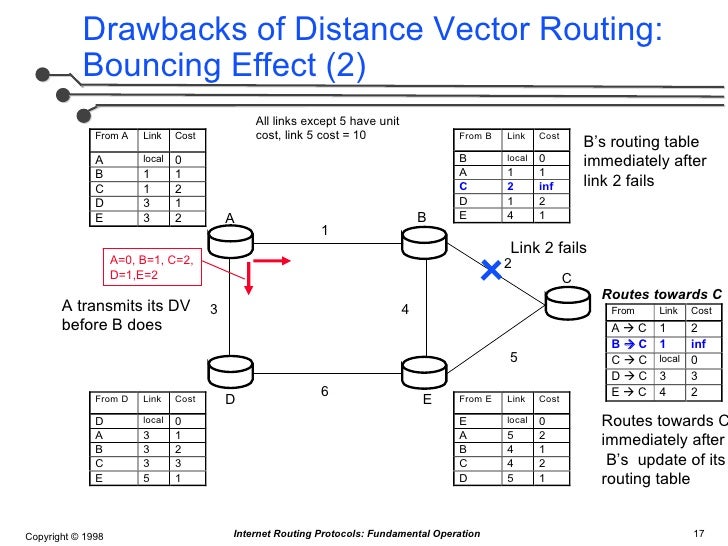
- Static: A predefined route has been set from data packet A to B.
- Dynamic: It dynamically finds the cheapest route from A to B at each node, the algorithm used here is Bellman ford algorithm.
Algorithm for Bellman Ford,
- Initialize the distance from the source node S to all other nodes as infinite (999999999) and to itself as 0.
- For every node in the graph do
- For every edge E in the EdgeList do
- Node_u = E.first, Node_v = E.second
- Weight_u_v = EdgeWeight ( Node_u, Node_v )
- If ( Distance [v] > Distance [u] + Weight_u_v )
- Distance [v] = Distance [u] + Weight_u_v


 Programmer Prodigy
One thought on “How does modern computer networking work?”