Transport Layers:
1.Transmission Control Protocol (TCP):
The computer sending the data connects directly to the computer it is sending the data it to, and stays connected for the duration of the transfer.
A real life comparison to this method would be to pick up the phone and call a friend. Your friend picks up the phone and responds with a hello or a an acknowledgment that he his free to talk right now. When he gives you an acknowledgement, then you start speaking. You have a conversation and when it is over, you both hang up, releasing the connection.

This proves the point that TCP connections are:
- A three way setup, connection request -> Acknowledgment -> Start sending data,
- Connection Oriented
- Reliable
TCP is a connection-oriented Layer. It moves data in a continuous, unstructured byte stream. Sequence numbers identify bytes within that stream.

- Source Port and Destination Port fields (16 bits each) identify the end points of the connection.
- Sequence Number field (32 bits) specifies the number assigned to the first byte of data in the current message. Under certain circumstances, it can also be used to identify an initial sequence number to be used in the upcoming transmission.
- Acknowledgement Number field (32 bits) contains the value of the next sequence number that the sender of the segment is expecting to receive, if the ACK control bit is set.
- Data Offset(a.k.a. Header Length) field (variable length) tells how many 32-bit words are contained in the TCP header. This information is needed because the Options field has variable length, so the header length is variable too.
- Reserved field (6 bits) must be zero.
- Flags field (6 bits) contains the various flags:
- URG—Indicates that some urgent data has been placed.
- ACK—Indicates that acknowledgement number is valid.
- PSH—Indicates that data should be passed to the application as soon as possible.
- RST—Resets the connection.
- SYN—Synchronizes sequence numbers to initiate a connection.
- FIN—Means that the sender of the flag has finished sending data.
- Window field (16 bits) specifies the size of the sender’s receive window .
- Checksum field (16 bits) indicates whether the header was damaged in transit.
- Urgent pointer field (16 bits) points to the first urgent data byte in the packet.
- Options field (variable length) specifies various TCP options.
- Data field (variable length) contains upper-layer information.
Applications where TCP is used are:
- Emails
- Online Transactions
- Socket Programming
2.User Datagram Protocol (UDP):
UDP does not connect directly to the receiving computer like TCP does, but rather sends the data out and relies on the devices in between the sending computer and the receiving computer to get the data where it is supposed to go properly.
A real life comparison to this method would be to be send a letter to friend via postal service. You put the letter in the postbox, and then you hope it reaches the destination. Sometimes it does not reach the destination.

This proves the point that UDP connections are:
- No acknowledgements are involved.
- Fast but no reliable.
UDP is a connection-less Layer. It has Checksum value for basic detection of faulty data packets.
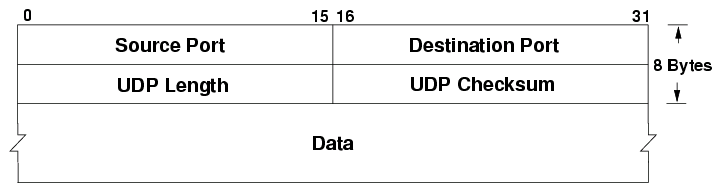
- Source Port and Destination Port fields (16 bits each) identify the end points of the connection.
- Length field (16 bits) specifies the length of the header and data.
- Checksum field (16 bits) allows packet integrity checking or error detection in the packet.
Applications where UDP is used are:
- YouTube
- Online Images

 Programmer Prodigy
One thought on “How does modern computer networking work?”