In Understanding Observability with OpenTelemetry and Coffee, I introduced the fundamentals of observability. In Native OpenTelemetry, I explored how OpenTelemetry generates and processes telemetry, how the OpenTelemetry Collector manages telemetry pipelines, and why understanding those pipelines matters when troubleshooting production issues.
But what happens after telemetry leaves the Collector? Which tools store and analyze it? How do you connect these tools, and what should you consider before operating them in production?
This article explores the open-source observability ecosystem, from the responsibilities of individual tools to the engineering decisions involved in running them together.
OpenTelemetry isn’t your observability backend
OpenTelemetry is an open-source, vendor-neutral observability framework. It provides APIs, SDKs, instrumentation libraries, and tools for generating, collecting, and exporting telemetry such as metrics, logs, and traces.
It also defines common data formats and semantic conventions that help applications describe telemetry consistently. However, OpenTelemetry isn’t an observability backend. It doesn’t replace the storage, query interfaces, and dashboards that teams use to investigate production issues. Those capabilities come from other tools.
Think of OpenTelemetry as the system that standardizes how information leaves each part of the coffee shop. The observability tools help you examine that information and understand what happened.
Let’s look at what each tool contributes to an observability stack.
Prometheus
Prometheus commonly scrapes metrics endpoints exposed by applications and infrastructure. This pull-based model lets Prometheus collect measurements at configured intervals and discover targets through supported service-discovery mechanisms.
Prometheus is useful when you need to answer questions such as:
- Is request latency increasing?
- Are error rates rising after a deployment?
- Is an application approaching its CPU or memory limits?
- Does the system meet its latency or availability targets?
Note: You can also use alerting rules to detect conditions that require investigation.
When integrating Prometheus with OpenTelemetry, decide how Prometheus will receive metrics. A common approach is to scrape an endpoint exposed by an application or the OpenTelemetry Collector’s Prometheus exporter.
Resources
- Documentation: Prometheus documentation
- Community: Prometheus community channels, including the #prometheus channel on CNCF Slack.
- Discussions: Prometheus user forum
Jaeger
Jaeger provides a platform for exploring distributed traces and understanding how requests move through services.
Jaeger is useful when metrics tell you that a service is slow but don’t explain which operation causes the delay. You can inspect individual traces to investigate service dependencies, slow operations, and errors.
When integrating Jaeger with OpenTelemetry, configure a compatible trace ingestion path, such as an appropriate OTLP endpoint. Also plan for trace storage and retention based on your deployment requirements. Jaeger uses a configured storage backend, so you must account for that backend in your architecture.
Resources
- Documentation: Jaeger documentation
- Community: Jaeger community channels, including the #jaeger channel on CNCF Slack.
- Discussions: Jaeger GitHub Discussions
OpenSearch
OpenSearch provides search and analytics capabilities for observability data, including application logs. Structured fields make it easier to filter records by service, environment, timestamp, or trace ID. For example, a log record might contain:
{"service.name": "payment-service","severity": "ERROR","message": "Payment provider timed out","trace_id": "example-trace-id"}
Fields such as service.name and trace_id can help you narrow a search and connect a log entry to a related request. That connection depends on your instrumentation, log format, ingestion configuration, and the way you query the data.
OpenSearch provides flexible search and analytics, but you need to configure ingestion, indexing, storage, and retention. For example, OpenSearch Data Prepper can process telemetry before sending it to OpenSearch.
Resources
- Documentation: OpenSearch observability documentation
- Community: Connect with the OpenSearch community, including its public Slack workspace.
- Discussions: OpenSearch community forum
Perses
Perses is an open-source dashboarding tool with an open dashboard specification and support for managing dashboards as code.
Perses doesn’t replace the systems that store telemetry. It queries configured data sources and displays their results. Its plugins determine which backends it can query. This separation lets teams manage dashboards independently of telemetry storage. However, dashboard definitions still depend on compatible data sources, queries, and configuration.
For example, a team might configure Prometheus as a Perses data source to display request rates, error rates, and latency measurements. Other data sources depend on the available plugins and configuration.
Resources
- Documentation: Perses documentation
- Community: Perses contact and community channels, including the #perses-dev channel on CNCF Slack.
- Discussions: Perses GitHub Discussions
How do these tools fit together?
An observability stack isn’t one application. Installing these components doesn’t automatically create a working observability stack. You must decide how data reaches each backend, which components process it, and how engineers access the results.
The following diagram illustrates one possible architecture. It distinguishes the Prometheus scrape process from the trace and log ingestion paths.
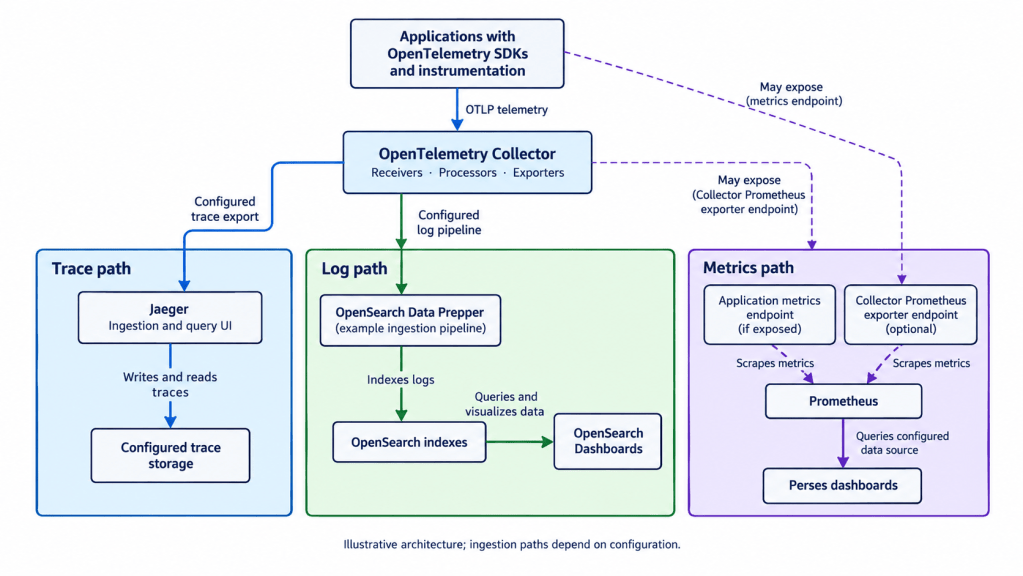
This architecture has three important parts.
- Ingestion: Choose how each backend receives data. The Collector supports multiple receivers and exporters, but not every backend uses the same ingestion method.
- Storage and analysis: Decide which systems handle each data set. You might store metrics in Prometheus, configure a storage backend for Jaeger, and store logs in OpenSearch.
- Routing data to multiple destinations is also possible when your requirements justify the additional processing and storage.
- Visualization: Decide where engineers will explore the data. Jaeger and OpenSearch provide their own interfaces. Perses supports reusable dashboards, but you must configure compatible data sources.
OpenTelemetry provides a foundation for telemetry transport. It doesn’t automatically configure every backend, unify their interfaces, or correlate all the data they contain. Correlation also depends on consistent attributes, trace context, and compatible ingestion and query capabilities.
What happens when an incident occurs?
Consider a production service whose response latency suddenly increases. An engineer might follow this workflow:

Metrics help you detect and scope the problem. Traces help you locate the delay, and logs provide events that may explain it. After applying a fix, check the relevant telemetry to verify that the system has recovered.
Start with one use case
You don’t need to deploy every tool at once. Start with one observability question and build the smallest setup that can help you answer it.
- Define the question. For example, determine whether a service’s request latency is increasing.
- Choose a backend. Select a tool that supports the type of data you need to investigate.
- Send test telemetry. Configure the required ingestion path and generate a small amount of test data.
- Verify the results. Query the data and confirm that the expected measurements and attributes appear.
- Document what you learned. Record the configuration, useful queries, and any limitations you encountered.
For example, you could start with Prometheus and query request latency for one service. Once you need to investigate individual requests, add tracing. If you also need to search detailed application events, introduce a log backend.
This approach helps you validate each component before expanding the stack. It also makes integration problems easier to identify while the system is still small.
What should you consider before choosing your stack?
A successful experiment doesn’t guarantee that a stack is ready for production. Before deploying it across services and environments, evaluate the integration work and operational responsibilities.
Integration and query models
Prometheus uses PromQL. OpenSearch supports its own query and analytics capabilities. Jaeger provides an interface for exploring traces, while Perses uses configured data sources and their respective query languages.
Engineers may need to switch between tools to investigate the same incident. You also need to configure data sources, align resource attributes, and preserve trace context in logs when you want to connect related events.
Reliability, storage, and security
Each deployed component introduces operational requirements. Plan for:
- Storage and retention: Estimate how data volume will grow and define retention policies for each signal.
- Availability: Decide how ingestion and investigation should behave when a backend becomes unavailable.
- Scaling: Determine how to handle increasing telemetry volume and query load.
- Security: Control access to telemetry and protect sensitive information.
- Maintenance: Manage upgrades, configuration changes, backups, and recovery.
These concerns become more important as the number of services, environments, and engineering teams grows.
Licensing and long-term flexibility
Open-source projects provide different levels of freedom depending on their licenses. Some products follow an open-core model, offering an open-source base while reserving some capabilities for commercial editions.
Before adopting a tool, review its license, governance, community activity, commercial feature boundaries, and data export options. Consider how difficult it would be to replace the component if your requirements change.
The goal isn’t to choose open-source software at any cost. It’s to make an informed decision about flexibility, operational effort, and long-term sustainability.
Self-managed stack or unified observability platform?
You can assemble an observability stack from individual open-source tools or use a platform that brings telemetry together in one place. The right choice depends on your team’s requirements, desired control, and capacity to operate the infrastructure.
| Consideration | Self-managed stack | Unified observability platform |
| Control | Choose and configure individual components. | Use the capabilities and configuration options provided by the platform. |
| Integration | Your team connects and maintains the components. | The platform provides an integrated experience for supported signals. |
| Operations | Your team manages the infrastructure, storage, upgrades, and maintenance. | The platform can reduce the work required to operate separate backends. |
| Flexibility | Customize components to meet specific requirements. | Evaluate supported integrations, export options, and platform limitations. |
| Best fit | Teams that need direct control and have the capacity to maintain the stack. | Teams that prioritize a unified investigation experience and reduced operational work. |
Note: Neither approach is inherently better. A self-managed stack gives you control over individual components, while a unified platform can reduce integration and maintenance work, which allows you to focus on your business logic.
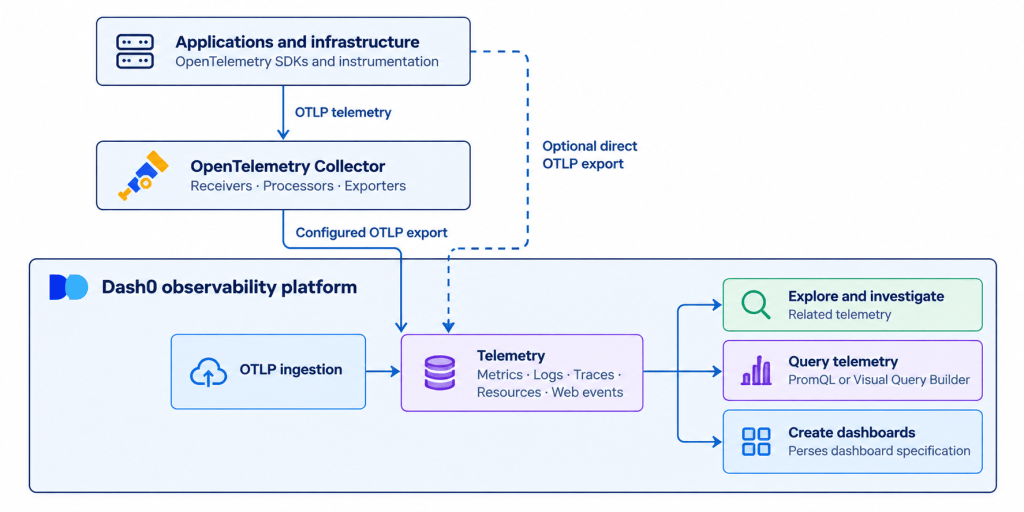
Dash0: Explore telemetry in one platform
Dash0 is an OpenTelemetry-native observability platform that brings metrics, logs, traces, and resource information together for analysis and investigation.
For example, when a service’s latency increases, you can examine metrics to understand the impact, inspect traces to identify slow operations, and investigate related logs to find potential causes within the same platform.
Dash0 supports PromQL and uses the Perses dashboard specification. These open standards help teams reuse familiar query capabilities and dashboard workflows. Dash0 isn’t a connector that automatically combines an existing Prometheus, Jaeger, OpenSearch, and Perses deployment. It’s an alternative approach that can reduce the need to operate these components separately, depending on your requirements.
Choose a self-managed stack when you need control over individual components and can maintain the infrastructure. Consider Dash0 when you want a unified place to investigate telemetry with less operational overhead.
Learn more in the Dash0 documentation.
Conclusion
An open-source observability stack is an architecture you design, not a set of tools that automatically work together.
Prometheus, Jaeger, OpenSearch, and Perses address different needs. OpenTelemetry provides a foundation for instrumentation and telemetry transport, but you must configure the data paths, storage, integrations, and investigation workflows.
You can assemble and maintain those components yourself, or evaluate a platform such as Dash0 to bring telemetry into a common observability experience. The best choice is the one that meets your requirements without introducing more operational complexity than your team can manage.


