Imagine you run a coffee shop with an online ordering system. A customer orders a cappuccino, completes the payment, and waits for a pickup notification. But the notification never arrives.
Your application generates telemetry as it processes the order. Traces capture the request’s journey, logs record events, and metrics show how the system behaves. But generating telemetry is only part of the problem. You also need to decide where it goes, what information it contains, and how to deliver it reliably so you can investigate issues.
The OpenTelemetry Collector helps you manage these tasks outside your application code. It receives, processes, and exports telemetry, giving you a dedicated layer for controlling your telemetry pipeline.
In Understanding Observability with OpenTelemetry and Coffee, I introduced OpenTelemetry's fundamentals through a coffee-shop example. In Native OpenTelemetry, I explored why visibility into telemetry processing matters. I also discussed the risks of sharing telemetry with AI tools in Before you paste telemetry data into an AI agent.
This article builds on those ideas to explain how the Collector manages telemetry, why you might need one, and what to consider when operating it in production.
The OpenTelemetry SDK and Collector: What’s the difference?
Think of the coffee shop’s ordering system as a software application. The application needs a way to record what happens while processing an order and export that information for analysis.
The OpenTelemetry SDK runs inside your application. It implements the OpenTelemetry APIs and provides the mechanisms for recording, processing, and exporting telemetry. Instrumentation libraries use these APIs to capture supported operations, such as incoming HTTP requests and database calls. You can also add manual instrumentation to record application-specific operations.
The OpenTelemetry Collector runs separately from your application. It receives telemetry from applications and other sources, applies configured processing, and exports the data to one or more destinations.
Here’s how the components work together:

The SDK can export telemetry directly to a backend. You don't need a Collector just to use OpenTelemetry.
The responsibilities can overlap. For example, both the SDK and Collector can support sampling and batching, depending on the implementation and configuration. The key difference is where the processing occurs and what it controls.
Do you need a Collector?
Let’s return to our coffee shop. When a customer places an order, the application checks ingredient availability, records the order, and contacts the payment service. OpenTelemetry instrumentation can generate telemetry for these operations.
You can export that telemetry directly to an observability backend or route it through a Collector.

However, imagine that your coffee shop expands to multiple locations. You now have several services running in different environments, and you want consistent metadata, filtering rules, and export configurations across all of them. Managing these responsibilities independently in every application can become difficult.
A Collector is particularly useful when you need to:
- Apply consistent processing rules across multiple services.
- Enrich telemetry with additional context.
- Filter data, batch exports, or control telemetry volume.
- Route telemetry to multiple destinations.
- Manage telemetry delivery independently of application code.
How does the Collector process telemetry?
The Collector organizes telemetry processing into pipelines. A typical pipeline uses three primary component types: receivers, processors, and exporters.

Each component has a specific responsibility.
Receivers: Accept telemetry
Receivers accept telemetry from applications and other sources.
For example, the coffee shop’s ordering system can use the OpenTelemetry SDK to export traces, metrics, and logs through the OpenTelemetry Protocol (OTLP). The Collector’s OTLP receiver accepts this data and passes it to the appropriate pipeline.
The Collector also supports other protocols and data sources, depending on the components available in your deployment.
Processors: Process telemetry
Processors transform, enrich, filter, or otherwise process telemetry before export.
Suppose the coffee shop has separate staging and production environments. You want to identify the environment that generated each measurement so engineers can distinguish test activity from production activity.
A resource processor can add an environment attribute. A batch processor groups telemetry before export, while a memory limiter helps protect the Collector from excessive memory use.
Other processors can filter telemetry or modify attributes. Processor order matters.
Each processor receives the output of the preceding processor. To activate a processor, you must include it in the relevant pipeline. Adjust the order to suit your pipeline. For example, if a filter depends on an attribute added by a resource processor, make that attribute available before the filter runs.
Exporters: Send telemetry to a destination
Exporters send processed telemetry to backends or other destinations.
For example, you can export traces to Jaeger over OTLP, expose metrics through an endpoint that Prometheus scrapes, or use a supported Prometheus Remote Write exporter with a compatible destination. You can also send logs to a compatible logging backend, such as OpenSearch, when the required integration is available.
Alternatively, you can send telemetry to an integrated observability platform such as Dash0.
The exact configuration depends on the Collector distribution and destination. This approach lets you manage downstream export configuration separately from your application’s instrumentation.
Where should you deploy the Collector?
You can deploy the Collector near your applications, run it as a shared gateway, or combine both approaches.
Two common deployment patterns are the agent and gateway patterns.
Agent pattern
In the agent pattern, a Collector runs close to the application or host that generates telemetry. On Kubernetes, you can deploy it as a DaemonSet or sidecar, depending on your requirements.
For the coffee shop, an agent could collect telemetry from the ordering service or its underlying infrastructure. This provides a local collection point for application and infrastructure telemetry.
Gateway pattern
In the gateway pattern, applications or local Collectors send telemetry to a shared Collector endpoint. The gateway processes the telemetry and exports it to the backend.
Imagine that the coffee shop operates several branches, each with its own services and infrastructure. A shared gateway provides a central place to manage processing rules, credentials, and export traffic.
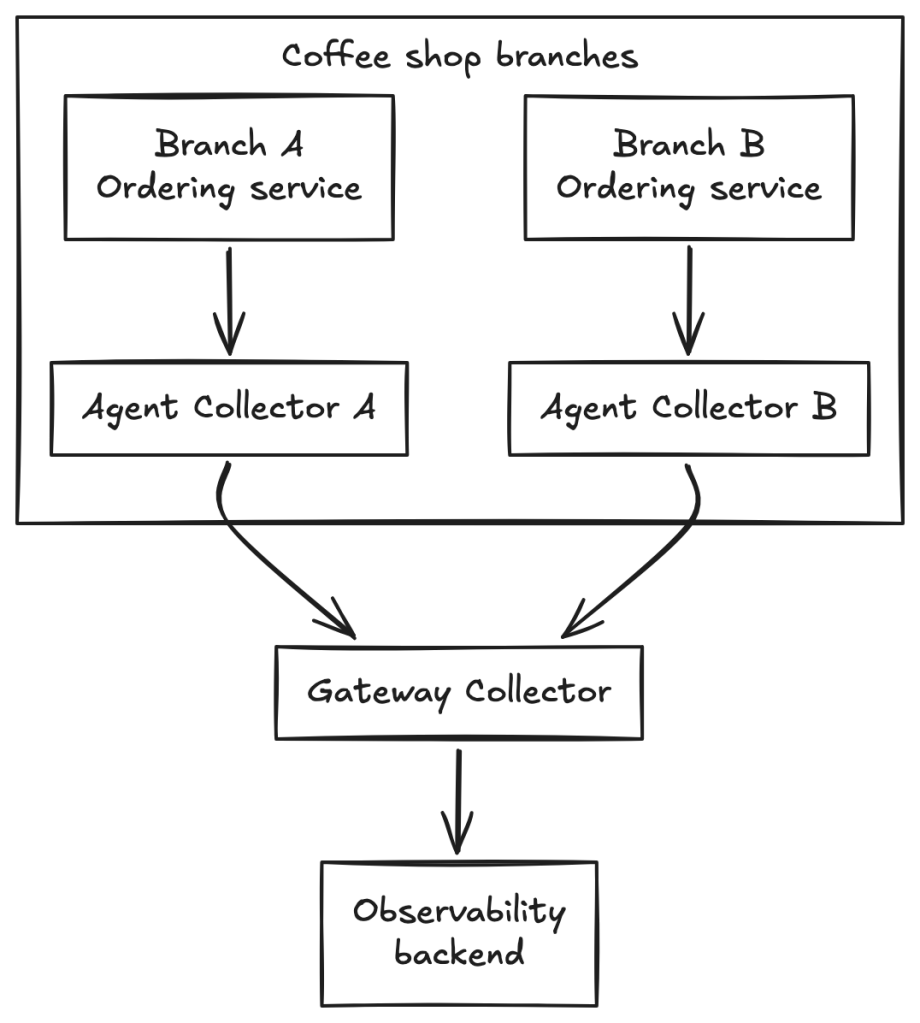
You can combine the two patterns. Agents collect telemetry near workloads, while gateway Collectors handle shared processing and export policies. Neither pattern is always better. The decision depends on your deployment architecture, scale, security boundaries, processing requirements, and operational capacity.
A gateway centralizes control but also concentrates traffic. You need to provide sufficient capacity and configure appropriate availability controls.
What happens to telemetry inside the pipeline?
The Collector can enrich and filter telemetry before exporting it. However, these decisions can affect the information available during an investigation.
The following YAML examples are configuration fragments, not complete Collector configurations. Define each processor and include it in the relevant pipeline under service.pipelines to apply it. Validate the configuration against the Collector distribution and version you use.
Add context to telemetry
Suppose the coffee shop has separate staging and production environments. You want to identify the environment associated with each service’s telemetry.
This approach helps standardize metadata at the collection layer. However, application-specific details, such as why the system applied a particular discount, might still require instrumentation in the application.
Filter sensitive information
Suppose the ordering system includes a customer’s email address in a span attribute. The coffee shop doesn’t want to send this information to its observability backend.
This removes the specified attribute from the telemetry the processor handles. It doesn’t automatically remove the same information if it appears in a log body, an event, or another attribute.
In Before you paste telemetry data into an AI agent, I explored the risks of exposing sensitive information and untrusted content when using AI tools to investigate production issues.
Manage telemetry volume
A busy coffee shop might process hundreds of orders during peak hours. Its ordering system can generate substantial telemetry, especially when requests pass through multiple services.
Batching, filtering, and sampling can help manage the volume of data sent to downstream systems, but they serve different purposes:
- Batching groups telemetry before export.
- Filtering removes selected telemetry records or attributes.
- Trace sampling determines which traces or spans to retain, depending on the sampling strategy.
Sampling can occur in the SDK or Collector, depending on your configuration and requirements.
Reducing telemetry volume involves trade-offs. Filtering might remove useful attributes, while sampling might exclude a trace that an engineer needs to investigate. The goal is to retain useful diagnostic information while managing resource usage and cost.
In Native OpenTelemetry we focus on understanding how telemetry is transformed or discarded helps engineers make informed decisions about data quality.
What happens when the backend becomes unavailable?
Suppose a customer places an order, but the observability backend becomes unavailable. The ordering service continues generating telemetry, and the Collector continues receiving it. Depending on its configuration, the Collector can queue outgoing telemetry and retry failed exports. This can help the pipeline recover when the destination becomes available again.
However, retries don’t guarantee delivery. If the backend remains unavailable and the queue reaches capacity, the Collector can drop telemetry. In-memory queues can also lose pending data if the Collector restarts.
When supported and configured, persistent storage can preserve queued telemetry across restarts. However, it doesn’t prevent every type of data loss.
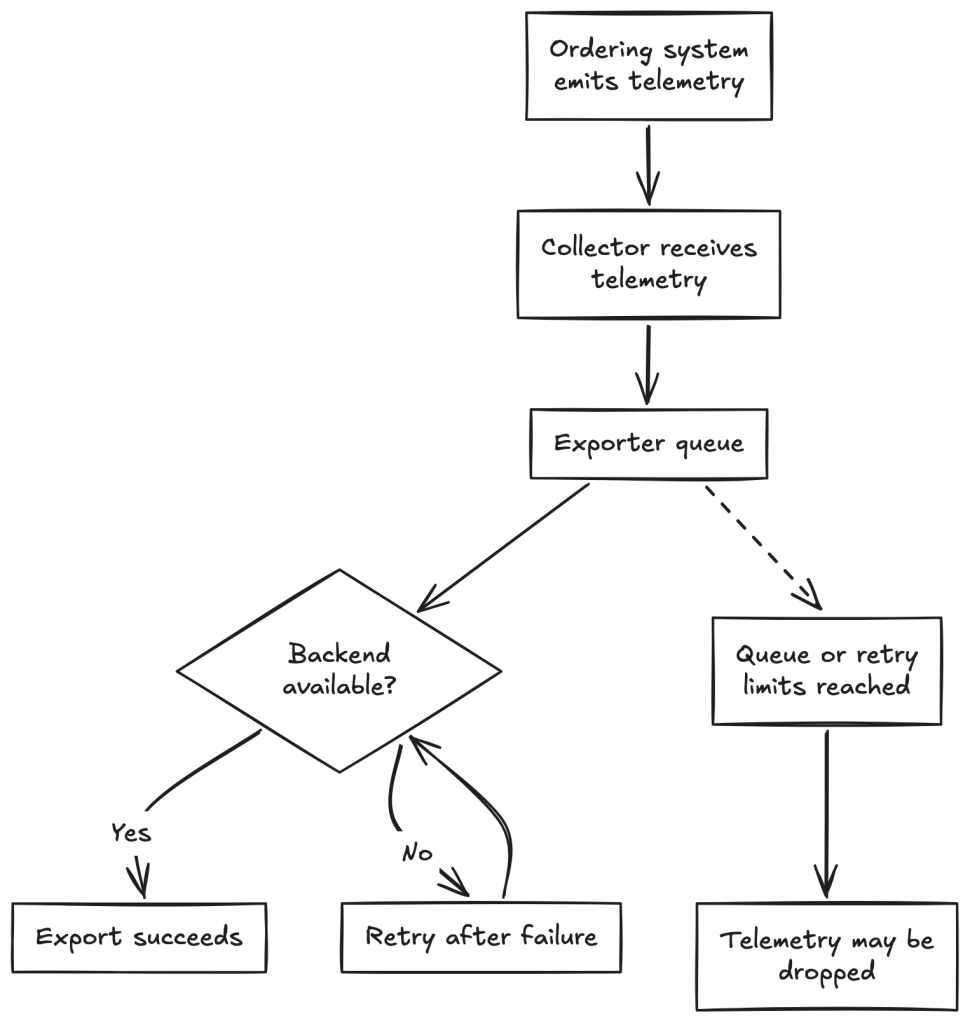
Before deploying a Collector in production, consider how much telemetry you need to buffer, how long to retry failed exports, and whether persistent storage is necessary. Monitor queue capacity and export failures so you can detect problems before they affect telemetry delivery.
Monitor the Collector itself
Imagine that the coffee shop’s ordering service continues sending telemetry, but the Collector can’t export it because the backend is unavailable. How would you know that the pipeline is falling behind?
The Collector exposes internal telemetry, including metrics for accepted and refused data, exporter failures, queue sizes, and resource usage. For example, a growing exporter queue might indicate that the backend can’t process incoming data quickly enough. An increase in export failures might indicate connectivity or configuration problems.
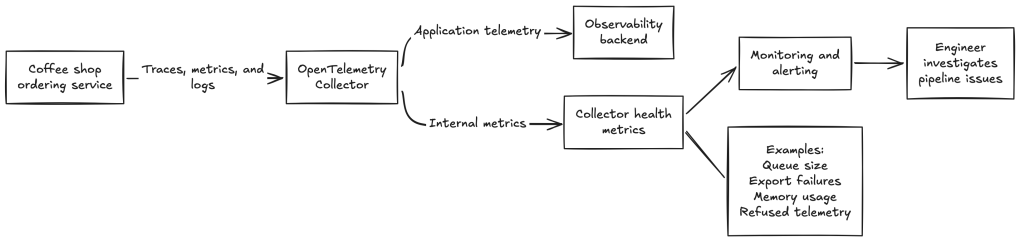
Monitor these metrics to identify issues with the Collector and investigate problems in the telemetry pipeline. Monitor both the applications that generate telemetry and the infrastructure that collects and exports it.
Where does Dash0 fit?
Dash0 is an observability platform that accepts OpenTelemetry data. You can configure the Collector to process telemetry before exporting it to Dash0. This keeps your application’s instrumentation separate from your backend configuration.
In our coffee shop example, the ordering system continues to generate telemetry through OpenTelemetry, while the Collector manages how that data is processed and delivered.
Alternatively, you can build a self-managed, open-source observability stack using tools such as Prometheus, Jaeger, and OpenSearch. This approach offers flexibility and control, but your team must maintain the individual components and their integrations.
An integrated observability platform can reduce the effort required to bring telemetry together and investigate issues. Choose the approach that best fits your organization’s requirements, resources, and operational needs.
For setup instructions, refer to the Dash0 OpenTelemetry Collector integration guide.
Conclusion: Treat telemetry as a pipeline, not an afterthought
OpenTelemetry standardizes how applications generate and export telemetry. The Collector provides a separate layer for managing how that telemetry is processed and delivered.
You can use the Collector to enrich data, batch exports, filter records, manage data volume, and route telemetry to one or more destinations. These capabilities become increasingly valuable as your architecture grows and observability becomes a shared responsibility across engineering teams.
However, introducing a Collector also means operating another component. You must configure its pipelines, secure its endpoints, allocate sufficient resources, handle failures, and monitor its health.

You don’t always need a Collector. Introduce one when you need greater control over your telemetry pipeline. The goal is to make telemetry collection and delivery consistent, manageable, and adaptable as your systems grow.


