Rolling update:
Deployments support updating images to a new version through a rolling update mechanism.
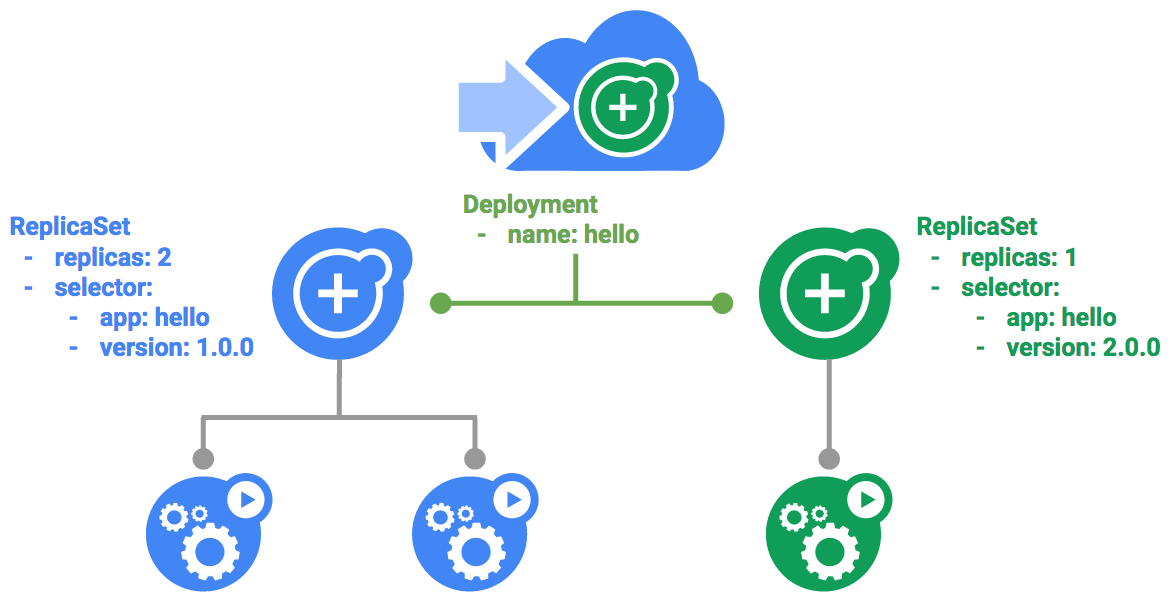
Trigger a rolling update,
1. Update your deployment
2.The updated Deployment will be saved to your cluster and Kubernetes will begin a rolling update.
kubectl get replicaset
3.You can also see a new entry in the rollout history:
kubectl rollout history deployment/hello
4.Pause a rolling update
If you detect problems with a running rollout, pause it to stop the update:
kubectl rollout pause deployment/hello
Verify the current state of the rollout:
kubectl rollout status deployment/hello
5.Resume a rolling update
The rollout is paused which means that some pods are at the new version and some pods are at the older version. We can continue the rollout using the resume command.
kubectl rollout resume deployment/hello
Verify the current state of the rollout:
kubectl rollout status deployment/hello
6.Rollback an update
Assume that a bug was detected in your new version. Since the new version is presumed to have problems, any users connected to the new Pods will experience those issues.
Use the rollout command to roll back to the previous version:
kubectl rollout undo deployment/hello
Verify the roll back in the history:
kubectl rollout history deployment/hello
Canary deployments:
When you want to test a new deployment in production with a subset of your users, use a canary deployment. Canary deployments allow you to release a change to a small subset of your users to mitigate risk associated with new releases.
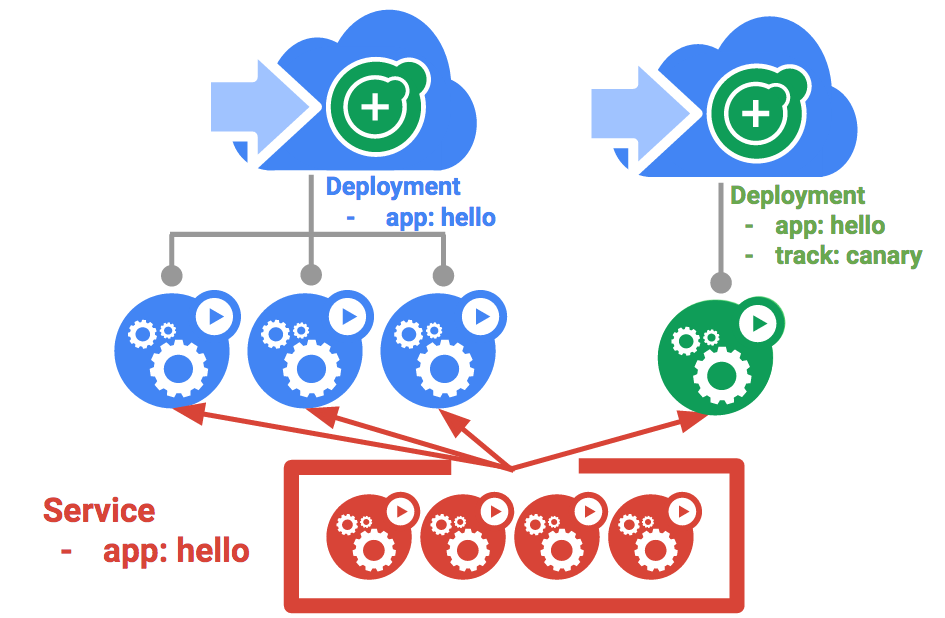
1.Create a new canary deployment for the new version:
cat deployments/hello-canary.yaml
2.Create the canary deployment:
kubectl create -f deployments/hello-canary.yaml
3.After the canary deployment is created, you should have two deployments, hello and hello-canary:
kubectl get deployments
4.Verify the canary deployment:
curl -ks https://`kubectl get svc frontend -o=jsonpath="{.status.loadBalancer.ingress[0].ip}"`/version
1.Blue-green deployments
Rolling updates are ideal because they allow you to deploy an application slowly with minimal overhead, minimal performance impact, and minimal downtime.
Kubernetes achieves this by creating two separate deployments; one for the old “blue” version and one for the new “green” version. Use your existing hello deployment for the “blue” version. The deployments will be accessed via a Service which will act as the router. Once the new “green” version is up and running, you’ll switch over to using that version by updating the Service.
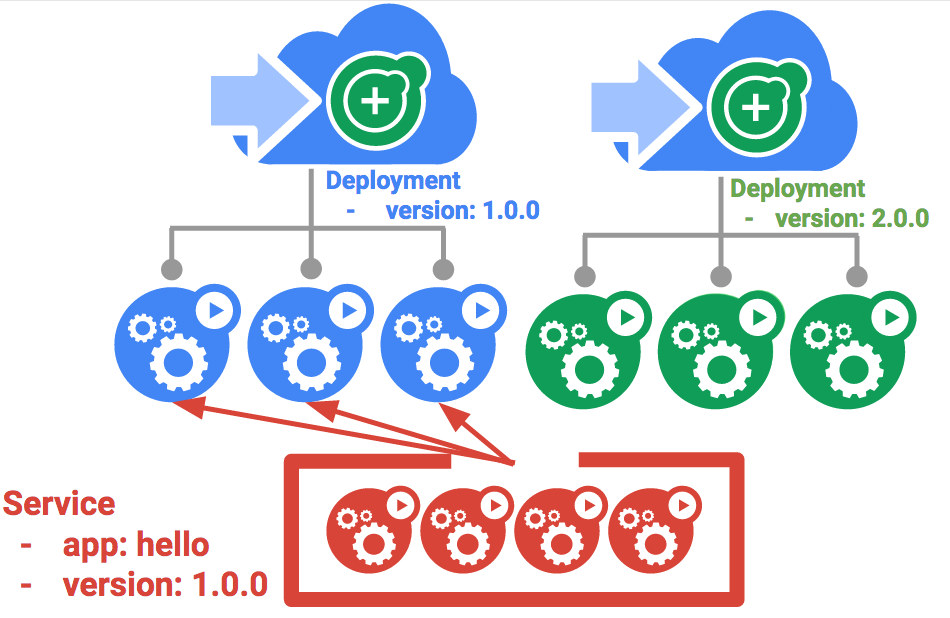
A major downside of blue-green deployments is that you will need to have at least 2x the resources in your cluster necessary to host your application.
1.Updating using Blue-Green Deployment
In order to support a blue-green deployment style, we will create a new “green” deployment for our new version. The green deployment updates the version label and the image path.
1.Create the green deployment:
kubectl create -f deployments/hello-green.yaml
2.Verify that the current version of 1.0.0:
curl -ks https://`kubectl get svc frontend -o=jsonpath="{.status.loadBalancer.ingress[0].ip}"`/version
3.Now, update the service to point to the new version:
kubectl apply -f services/hello-green.yaml
4.With the service is updated, the “green” deployment will be used immediately. You can now verify that the new version is always being used.
curl -ks https://`kubectl get svc frontend -o=jsonpath="{.status.loadBalancer.ingress[0].ip}"`/version
2.Blue-Green Rollback:
If necessary, you can roll back to the old version in the same way. While the “blue” deployment is still running, just update the service back to the old version.
kubectl apply -f services/hello-blue.yaml
Once you have updated the service, your rollback will have been successful. Again, verify that the right version is now being used:
curl -ks https://`kubectl get svc frontend -o=jsonpath="{.status.loadBalancer.ingress[0].ip}"`/version
Continuous Delivery in Kubernetes Engine
What is Continuous Delivery / Continuous Deployment?
After you create a sample application, you configure these services to automatically build, test, and deploy it. When you modify the application code, the changes trigger the continuous delivery pipeline to automatically rebuild, retest, and redeploy the new version.
To continuously deliver application updates to your users, you need an automated process that reliably builds, tests, and updates your software. Code changes should automatically flow through a pipeline that includes artifact creation, unit testing, functional testing, and production rollout.

 Programmer Prodigy
One thought on “Google Kubernetes Engine basics”