Scaling :
While scaling is a great and wonderful thing, there are some things that need to be considered. Depending on your application, there are all sorts of things that may change how you’re scaling.
1.Scaling Constraints :
Not everything can scale in the same way. If you have a limited number of licenses, and getting more requires a lot of time, approval, or just a lot of processes to work through, dynamically scaling can be very difficult. Or perhaps your application just can’t support the downtime it would take to change the underlying architecture so that it can handle more of a workload.
Architecting in such a way so that you don’t have to dynamically scale would be the way to go. Looking at adding other components to help when you can’t scale would be a good way to design around this. Resources like managed caches and queues help to not lose requests when scaling is limited. Also, offloading unnecessary work from UN-scalable servers could help.
what if you have resources that technically can scale but you don’t wanna lose session data in the process?
2.Session data management :
If your application has session data that you’re trying to maintain but also need to scale to adjust the changes in demand, the easiest thing to do is just store your session data off the instance, using off-server session storage can really help provide scaling in what could otherwise be a very constrained environment. Using data stores like caches can really help to maintain functionality while not limiting your scaling capabilities.
3.major scaling methodologies :
3.1.Horizontal scaling :
Horizontal scaling or scaling out is when we add more resources and distribute across them. The benefit of this is it incurs no downtime for your original resource. As the load continues to grow, we can continue to add more and more resources, and spread the load across them. Once your load subsides and we need less resources, we can scale back in to the original number. This is done with little to no impact to your end user.
3.2.Vertical Scaling :
With vertical scaling, you maintain the same logical resource but you’re making that resource more capable. Adding things like memory, storage, or compute power so that that resource can handle more of a workload. With this type of scaling, you don’t have to distribute requests across multiple, because you do still have that one same logical resource. But there are some limitations.
- there typically is some downtime when you are vertically scaling.
- while you’re scaling, you typically scale up but I guess you don’t scale back down.

Q.What is High availability ?
It’s building in such a way that allows for increased uptime, or availability. Designing for the highest levels of availability is always a good practice, and moving into a cloud environment like AWS makes this easier than trying to achieve the same levels of availability in a traditional environment.
A primary principle here is to avoid single points of failure. If the failure of any single component or node would cause a negative impact to the system as a whole, look for ways to minimize the impact.
- In some cases, this could mean running more than one instance of a component, and in other situations, it could mean having a replacement that can easily be launched should the primary fail.
- Another way to help build towards higher availability is to utilize ways to distribute traffic and requests across multiple endpoints or nodes. Using load balancers is a major way this can be accomplished.
- To monitor your environments. Monitoring can help you identify expected trends, trigger actions for anything outside of normal behavior, and help you to automate recovery of anything that might fail within your environment.

Considerations with Migrating DB vs Applications
When migrating applications, much of the time and energy goes into ensuring consistent or maybe even improved performance. Planning and preparation is put into being ready when the switch finally happens and there is rarely any middle phase to worry about between environments.
With your data, because this is often one of the most crucial components of your application’s environment, there may still be access requirements before, during, and after the migration. This is a one of the reasons that database and datastore migration is so important to consider and plan when handling the migration.
- It is likely that many questions about your database will be well-known before your migration is even a discussion. Things like the size, schema, types of tables and engine specific limitations are usually topics that are regularly discussed and reviewed.
- Next, you’ll want to understand your requirements. The requirements of your database for normal operation while migrating and in your new environment will all need to be analyzed.
- Are you replacing anything about the platform of your database? Do you know all the key parameters of your new environment? Can your app afford downtime and how long can this downtime be? How much of the data needs to be migrated now versus later?,
- You will need to know the limitations of your network, how much of your bandwidth is available for you to use, how much of your network utilization can your database handle in both your source and destination locations. Keep in mind that during the migration, you may be placing additional load on the database. How much of an additional load and for how long is going to depend on the migration methods.
- Another area to look into is planning your talent. Someone needs to know the source and destination database engines which can be multiple people if any changes are being made. Somebody needs to know about servers, ports, and firewall rules, and how to handle the network requirements from a practical operations perspective as opposed to just theoretical. So planning and gathering who is going to be involved becomes very important.
- The last item I want to cover is planning your time. Database migration projects often include refactoring of the application and database code, and also the schema. All of this is a time-consuming and iterative process. The refactoring process alone can take anywhere from a few weeks to several months depending on the complexity of your application and database.
These are just some of the areas for you to focus on when looking at how database migration differs from direct application migration.
AWS Sever management Service (SMS) :
AWS Server Migration Service (SMS)specifically meant to enable an easier transfer of your virtual resources directly into your AWS cloud environment. SMS is an agentless service, which makes it easier and faster for you to migrate up to thousands of on-premise workloads to AWS.
The service allows you to automate, schedule and track incremental replications of live server volumes and makes it easier for you to coordinate small and large scale server migrations
There are some requirements that you need to be aware of when using the service.
- The main requirement is that AWS SMS is currently only available if you are migrating VMware vSphere, Microsoft Hyper-V, and Azure virtual machines into the AWS cloud. Keep an eye out for any updates to the supported source environments by checking the AWS Server Migration Service documentation.
- Another requirement for you to be aware of is that SMS replicates your server VMs as cloud-hosted Amazon Machine Images that can be deployed on EC2.
- This does not move VMs into functions or any other area of AWS but it does allow for you to launch your server VMs as Amazon EC2 instances.
- The last requirement is that if you want to use SMS to help you transfer server VMs from your origin environment into AWS, you must use a connector.
- The server migration connector is a free BSDVM that you install in your on-premise virtualization environment. The connector aids in the creation of appropriate permissions and network connections that allow SMS to execute tasks in your virtualized environments
- Testing is also simple to automate because the migrations create EC2 AMIs which can easily be launched and tested for verification of successful migrations.
- Monitoring of your migrations is made possible by Amazon CloudWatch and logging and auditing can be done through AWS CloudTrail.
VM Import and VM on AWS (Server Migration Service) :
VM import/export enables you to easily import virtual machine images from your existing environment to AWS, as Amazon EC2 instances or Amazon Machine Images, AMIs. This enables you to migrate applications and work loads to Amazon EC2, copy your VM image catalog to EC2, or create a repository of VM images for backup and disastor recovery.
For most VM import needs we recommend that you use the AWS Server Migration Service, since it automates the import process. It can simplify the process overall. Requiring just a few clicks in the AWS management console once everything is set up.
AWS Migration Hub :
Using Migration Hub allows you to choose the AWS and partner migration tools that best fit your needs while providing visibility into the status of migrations across your portfolio of applications.This allows you to quickly get progress from updates across all of your migrations, easily identify and troubleshoot any issues, and reduce the overall time and effort spent on your migration projects while providing a single place to monitor migrations in any AWS region where you migration tools are available.
In order to view your assets in Migration Hub, you perform discovery using an AWS discovery tool or by migrating with an integrated migration tool. Once you’ve performed discovery or started migrating, you can explore your environment from within Migration Hub. When the migration completes, Migration Hub also shows details about the resources that have been created by the migration.
- For servers migrated by AWS Server Migration Service, CloudEndure Migration, and other migration services and partners, Migration Hub provides links to the AMIs created or running Amazon EC2 Instances.
- For databases migrated by AWS Database Migration Service, Migration Hub provides the target endpoint ID which can be used as a search filter on the Database Migration Service Management Console.

AWS Application Discovery :

The AWS Application Discovery Service helps you to plan your migration to the AWS cloud by collecting usage and configuration data about your on-premises servers. Application Discovery Service offers two ways of performing discovery and collecting data about your on-premises servers;
1.Agentless discovery :
Agentless discovery works with VMware vCenter, and can be performed by deploying the AWS Agentless Discovery Virtual Appliance. After the discovery connector is configured it identifies virtual machines and hosts associated with vCenter. The discovery connector collects configuration information about your servers, like server host names, IP addresses, Mac addresses, and disc resource allocations, also collects metrics about the VMs. It can inform decisions like what type and size of EC2 instance to use.
Discovery connector cannot look inside each of the VMs, so it cannot figure out what processes are running on each VM, or what network connections exist. If you need insights into that type of information, then using an agent-based approach will be required.
2.Agent-based discovery :
Agent-based discovery can be performed by deploying the AWS Application Discovery Agent on each of your VMs and physical servers. The agent will then collect static configuration data, similar to the discovery connector. In addition to those static config details, the agent will record detailed time series systems performance information, inbound and outbound network connections, and processes that are running.
You can export this data to perform an analysis and to identify network connections between servers for grouping servers as applications. The Application Discovery Service is integrated with our AWS Migration Hub, which helps to create a single pane of glass view into migration progress.
All of the data that is collected by the Application Discovery Service can be exported for analysis using tools like Amazon Athena and Amazon QuickSight.

Data Considerations When Migrating :
The tools for migrating data to the AWS Cloud are either unmanaged or AWS-managed. Some options for data migration, depending on the volume of data and the velocity of migration.
Unmanaged migration tools are the easy, one-and-done methods to move data at small scales from your site into Amazon cloud storage. These include options like rsync or the Amazon S3 and Amazon S3 Glacier command line interfaces.
AWS-managed migration tools help you manage the data migration tasks more efficiently and can be further classified into two broad categories: tools that optimize or replace the internet, like direct connect, and tools that provide a friendly interface to Amazon S3. If you have large archives of data or data lakes or in a situation where bandwidth and data volumes are simply too large, you might want to lift and shift the data from its current location straight into AWS. You can do this either by using dedicated network connections to accelerate network transfers or by physically transferring the data using AWS Snowball
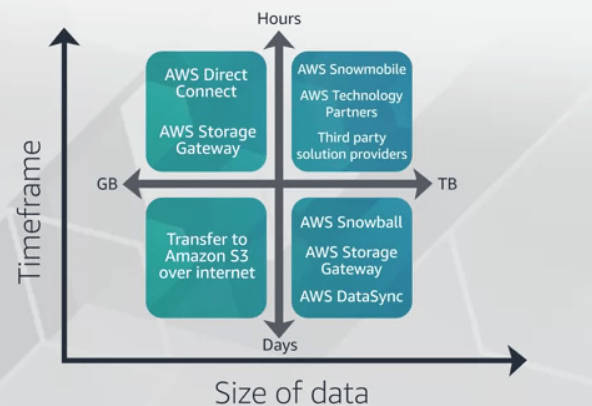
Storage options while migrating :
1.Amazon EFS, Amazon EBS, & Amazon S3 :
So while you’re planning out your migration, be thinking about what the best storage option for your various workloads might be. Test and experiment with them and find out what provides the most optimal performance to meet your needs.
1.1.Amazon Elastic Block Store or EBS :

This provides block level storage volumes for use specifically with EC2 instances. EBS volumes behave like raw, unformatted block devices that you can mount as devices to your instances. And while you can mount multiple volumes on the same instance, each volume can only be attached to one instance at a time. Within EBS there are several configurations open to you and the volume types that you can choose include both SSD and traditional HDD options.
The general purpose volume is the most common type and the default volume used by Amazon EC2.
- General purpose SSD volumes provide strong levels of performance for a wide variety of workloads. You also have the ability to adjust the level of performance you may require. These are best utilized when you need consistent and high levels of performance.
- For our HDD volumes we have another two options for you to consider.
- For the throughput optimized volumes, these are for frequently accessed throughput intensive workloads. While it’s not the fastest type of storage in EBS, it is a great balance of cost and functionality.
- cold HDD volume. These are going to be best suited for scenarios where the lowest cost block storage is of utmost importance. The major difference between throughput optimized and cold HDD is unsurprisingly enough, the throughput.

1.2.Amazon Elastic File System.
Elastic File System, also known as EFS allows you to create a file system, mount the file system on EC2 instances and then read and write data to and from your file system. First off EFS can be mounted to multiple EC2 instance at the same time. This enables you to have a shared file system for multiple servers. Secondly EFS is just that, a shared file system. EFS is a file storage system that uses NSFv4. That other difference is that your AWS housed EFS can be mounted to by on premise servers. So now that we’ve looked at EBS and EFS.

1.3.S3 :
S3 is an object storage system that was intentionally built with a minimal feature set that focuses on simplicity and robustness. To use S3, all you do is create a bucket which is a container for your objects and then start loading in the objects. In S3 once you’ve created the bucket, you can work with objects either through API or directly through the console.
Though S3 is a natively internet based service, meaning that access is provided through internet accessible endpoints, it does not mean that there’s any loss or compromise on how secure your data is. Through access control lists, bucket policies, encryption options and additional security features, you have full and granular control on how you grant access to objects in your buckets. In terms of migration, S3 is unique in that it can be used not only to store objects for your applications to utilize after migration, but can also be a great location to store images, backups, database dumps and other components that are used while migrating.
- Amason Elastic File System (Amazon EFS)
- Amazon Elastic Block Store (Amazon EBS)
- Amason EBS Volume Types
- Amason Simple Storage Service (Amazon S3)

2.Storage – AWS Snowball & AWS Snowmobile :
AWS Snowball is a physical device that can be connected directly to your network in the data center, and leverage the local network to copy the data. An AWS Snowball device can currently hold up to 80 terabytes, and is protected by AWS Key Management Service to encrypt the data. Using Snowball, you can import and export data between your on-premises data storage locations, and Amazon S3. The Snowball is its own shipping container, and its E-ink display changes to show your shipping label when Snowball’s ready to ship.
But what if you have a lot of data to move? Not gigabytes or terabytes, or even petabytes, but exabytes of data? the answer is AWS Snowmobile, this storage on wheels service holds up to 100 petabytes of data.
3.AWS Storage Gateway Now with AWS DataSync :
AWS Storage Gateway utilizes a VM image in your on-prem environment that securely connects to the gateway endpoint within AWS. This allows you to connect your local storage resources to the AWS cloud and enables you to add availability, fault tolerance, and scalability to your storage mechanisms. For solutions, Storage Gateway offers file-based, volume-based, and tape-based options.
- File Gateway, the file-based solution supports a file interface into Amazon Simple Storage Service or S3 and it enables you to store and retrieve objects in S3 using industry-standard file protocols such as Network File System, NFS, and Server Message Block or SMB.
- A Volume Gateway provides cloud back storage volumes that you can mount as iSCSI devices from your on-premises application servers. With this volume-based solution, you do have two configuration options. There are cached volumes and stored volumes.
- Cached volumes allows you to store your data in S3 and retain a copy of frequently accessed data subsets locally.
- Stored volumes can be a solution for when you need low-latency access to the entire dataset. All of the data is stored locally and snapshots can be made from the on-prem storage and used to either recover local volumes or create volumes inside of your AWS accounts.
- A Tape Gateway, you can durably archive backup data into AWS. A Tape Gateway provides a virtual tape infrastructure that scales seamlessly with your business needs and eliminates the operational burden of provisioning, scaling, and maintaining a physical tape infrastructure.
DataSync is a data transfer service that simplifies, automates, and accelerates moving and replicating data between on-prem storage systems and AWS storage services over the internet or AWS Direct Connect. This may sound somewhat similar to Storage Gateway but the major differences are that DataSync primarily is utilized to transfer from an NFS source and the destination can be the EFS. Similar to Storage Gateway, DataSync uses an agent which is a virtual machine that is used to read or write data from on-prem storage systems.
For more information, AWS DataSync

AWS Database Migration Service :
Database migration is a complex, multiphase process, which usually includes assessment, database schema conversion script conversion, data migration, functional testing, performance tuning, and many other steps. Read this blog for more info: Database Migration – What Do You Need to Know Before You Start?
1.AWS Database Migration Service (DMS) :
It is a tool that makes it easier to migrate relational databases, data warehouses, NoSQL databases, and other types of data stores. You can use it to migrate your data into the AWS cloud, between on-premises, or between a combination of cloud and on-premises setups. Also, if you need to perform a schema change while migrating there is an accompanying tool with DMS called AWS Schema Conversion Tool which supports converting your existing database schema from one database engine to another.

To perform a migration, DMS connects to the source data store, reads the source data, and formats the data for consumption by the target data store where it can then load the data into the target. DMS also provides the ability to monitor the migration so that you can keep an eye on everything happening. The service supports migrations to and from the same database engine, like Oracle to Oracle, and also migrations between different database platforms such as Oracle to MySQL or MySQL to Amazon Aurora. You can also use DMS to migrate your on-premises database to a database running on Amazon EC2 instances. DMS can be configured to perform an on-going replication which can allow you to migrate databases with zero downtime.
To use AWS DMS, one endpoint must always be located in an AWS service. Migration from an on-premises database to another on-premises database is not supported.

2.Aurora :
Aurora is a MySQL and PostgreSQL compatible database engine offering within Amazon Relational Database Service, known as RDS. Aurora is designed to provide multiple times the throughput of traditionally available database engines, but without having to make drastic changes in how your applications access your data. It is a fully managed and distributed system that is able to meet the higher levels of performance by utilizing an SSD-backed virtualized storage layer specifically built for database workloads. Additionally, Aurora’s storage is fault tolerant and self-healing. Disc failures are repaired in the background without loss of database availability.
Amazon Aurora Serverless, which is a configuration that can be used for Aurora, is an auto-scaling solution, where the database will automatically start up, shut down, and scale capacity up or down based on your applications needs. It enables you to run your database without the difficult task of database capacity management. With Aurora Serverless, you can create a database endpoint without specifying the DB instants class size. Instead, you set the minimum and maximum capacity. The database endpoint connects to a proxy fleet that routes the workload to the fleet of resources that are automatically scaled. Aurora Serverless manages the connections automatically. The reason that the scaling is so rapid is because it uses a pool of “warm” resources that are always ready to service requests.
Here’s a quick overview of Amazon Aurora and how Aurora Serverless works.

3.AWS Direct Connect & Amazon Route 53 :
During the migration, we’ll need to be able to transfer data, like our virtual machines, storage volumes, and databases. After the migration, we’ll need to be able to perform tasks like monitoring, ongoing replication, and potentially additional data transfers. AWS services are delivered over the internet. For many actions and activities we can simply use the AWS management console or AWS service APIs, which only require an internet connection to access. Many administrative tasks can be accomplished in the management console. When we start getting into automation and tools.
However, when we want to talk with our own resources running inside of AWS, there are very few occasions when we would want to make those connections or perform those tasks over the open internet.
- The first option is one that many people will be familiar with, VPN over the internet. There’s several options for creating and configuring a VPN connection. The important part for our migration is to understand that this connection establishes a secure tunnel or link from your network to AWS. With the right configuration, the resources that you have running in AWS can be seen as an extension of your on-premise network. In this example, we’re still using our internet connection to talk with AWS, and our resources in AWS, but the VPN tunnel allows for that communication to happen securely.
- If your migration or operational requirements need dedicated bandwidth to talk to AWS, or you have a requirement to not use the open internet for communication, there’s AWS Direct Connect. Direct Connect links your internal network to a Direct Connect location over a standard one gigabit or 10 gigabit ethernet fiber optic cable. With this connection in place, you can create virtual interfaces directly to the AWS cloud, for example, to Amazon EC2 and Amazon S3, and to Amazon VPC, bypassing the need for public internet in your network path.
- You can also establish a VPN tunnel over the Direct Connect link, allowing for a secure tunnel of communication from your on-premises resources to the resources in AWS. These connection options can allow for AWS to act as an extension of your network, which enables smoother data transfers, migration cutovers, and ongoing replications.

Deployment Strategies :
So let’s talk about two main deployment or cut-over methods.
1.Red-black :
In the red-black method, you have your original environment, you have the new environment, and they’re both running. You’ve set up the records and DNS for both endpoints and data is being replicated across the environments. Once everything is ready to go, you simply switch the DNS over to the new environment.
In this method, you still keep the original environment running and if you experience any issues with the migrated application, you can cut back to the original.
2.Blue-green :
Setup is the exact same with both environments being up, tested, and running and DNS setup is still there. The big difference here is that your cut-over needs to be more gradual. With this setup, instead of an instant cut-over, you’re only shifting a small percentage of traffic at a time, maybe 5%, maybe 10.
The major reason for this is to avoid downtime. In red-black, if you have an issue once traffic has been shifted, the application could be down until you’re able to move traffic back to the original environment which could negatively impact any users of the application. With blue-green, issues are less widespread and the number of affected users due to an issue is easier to manage.
Though that doesn’t mean blue-green is without its limitations.
- you have to be using a DNS service that gives you the ability to control the amount of traffic going to each endpoint. While Amazon Route 53 does have this capability, not all DNS services do.
- this method requires a lot more management. Shifting the traffic over little by little can require some manual effort which may not be wanted.
Outside of that, there is a major consideration to keep in mind for both of these methods and that is you need to have monitoring in place to evaluate if any issues are encountered. If you aren’t able to identify that errors are occurring, then it’s difficult to know whether you need to move back to the original environment or not.

 Programmer Prodigy
One thought on “AWS Fundamentals: Migrating to the Cloud”