Using a documentation-as-code approach. Ensures that documentation stays in sync with the code and is developer-friendly. Unlike the traditional code-first approach to building APIs, it often results in inconsistent information. This inconsistency makes it difficult for developers to use and integrate APIs.
This blog explains how to build APIs using a docs-first approach. I will also highlight open-source tools such as AsyncAPI and JSON Schema.
Docs as code
A docs-first approach means writing the documentation before developing the API. You can identify potential issues early and provide clear guidance for developers. Some other benefits of this approach are:
- Ensuring clarity and consistency in the API’s functionality and endpoints.
- Allowing stakeholders to review and provide feedback before development starts.
- Identifying potential challenges and refining the API design.

Docs first approach provides developers with comprehensive and up-to-date documentation. This makes it easier to integrate and use the API.
Designing APIs
Designing an API requires planning to ensure it is functional and user-friendly. API design is an iterative process that involves addressing these questions. After designing your API, you need to model it by answering these questions:
- Determine who should have access to which API.
- Determine how to expose this functionality.
- Outline the logic that the API implements.
- Divide the logic into smaller, manageable steps.
- Use tools like Swagger or OpenAPI to define your API. You can also generate skeleton code for the client and server.
For example, consider you are designing a Coffee Catalog API.
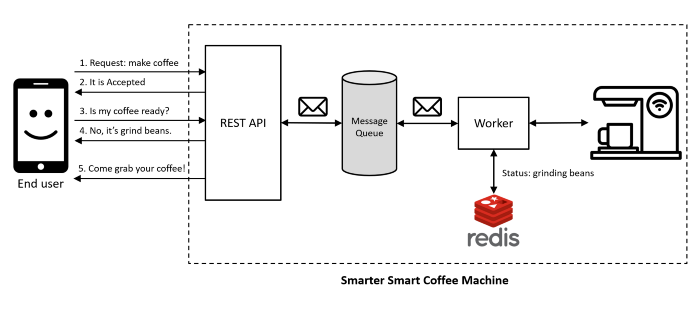
- Identify Users who would interact with the API to manage products.
- Expose functionality via RESTful endpoints.
- Identify Logic: The API should allow users to,
- List coffees.
- Retrieve coffee details.
- Create new coffee.
- Delete Coffees.
- Break Down Logic:
- List Coffees: Retrieve a list of all coffees.
- Retrieve Coffee Details: Get details of a specific coffee by its ID.
- Create coffee Product: Add a new product to the catalog.
- Delete coffee Product: Remove a product from the catalog by its ID.
- Create API definitions using OpenAPI. Generate skeleton server code to implement the logic, and client code to call the logic.
Ensure your API adheres to REST API follows:
- Client-server architecture to separate the user interface from the data storage.
- Each client request must contain all the information to be stateless.
- Responses must state whether they are cacheable or non-cacheable.
A quick tip: If you want to model your API quickly,
- Look for verbs to identify actions.
- Look for nouns to identify resources.
OpenAPI Specification (OAS)
The OpenAPI Specification (OAS) is a standard for defining RESTful APIs. This provides a consistent way to describe
- API endpoints
- Request/response formats
- Authentication methods.
OAS definitions can be written in either YAML or JSON format. By understanding its top-level sections, you can document your APIs more effectively. The OpenAPI Specification includes:
- Info: General information about the API (version, title, description).
- Servers: Base URLs for the API.
- Paths: Endpoints of the API and the supported operations.
- Components: Reusable schemas, parameters, responses, and security definitions.
- Security: API security methods (e.g., OAuth2, API keys).
- Tags: Grouping and organising API endpoints.
The info and paths objects are essential, while other sections enhance the functionality. For example, considering the Coffee Catalog example
openapi: 3.0.0
info:
  version: "1.0.0"
  title: "Coffee Catalog API"
  description: "An API for managing a coffee catalog"

servers:
  - url: "https://api.coffee-catalog.com/v1"
    description: "Production server"
  - url: "https://dev.api.coffee-catalog.com/v1"
    description: "Development server"

paths:
  /coffees:
    get:
      summary: "List all coffees"
      tags: [Coffees]
      responses:
        '200':
          description: "A list of coffees"
          content:
            application/json:
              schema:
                type: array
                items:
                  $ref: "#/components/schemas/Coffee"
    post:
      summary: "Create a new coffee"
      tags: [Coffees]
      requestBody:
        description: "Coffee to create"
        required: true
        content:
          application/json:
            schema:
              $ref: "#/components/schemas/NewCoffee"
      responses:
        '201':
          description: "Coffee created"
          content:
            application/json:
              schema:
                $ref: "#/components/schemas/Coffee"

  /coffees/{coffeeId}:
    get:
      summary: "Get a coffee by ID"
      tags: [Coffees]
      parameters:
        - $ref: "#/components/parameters/CoffeeId"
      responses:
        '200':
          description: "Details of a coffee"
          content:
            application/json:
              schema:
                $ref: "#/components/schemas/Coffee"
        '404':
          description: "Coffee not found"
    put:
      summary: "Update a coffee"
      tags: [Coffees]
      parameters:
        - $ref: "#/components/parameters/CoffeeId"
      requestBody:
        description: "Updated coffee information"
        required: true
        content:
          application/json:
            schema:
              $ref: "#/components/schemas/NewCoffee"
      responses:
        '200':
          description: "Coffee updated"
          content:
            application/json:
              schema:
                $ref: "#/components/schemas/Coffee"
        '404':
          description: "Coffee not found"
    delete:
      summary: "Delete a coffee"
      tags: [Coffees]
      parameters:
        - $ref: "#/components/parameters/CoffeeId"
      responses:
        '204':
          description: "Coffee deleted"
        '404':
          description: "Coffee not found"

components:
  schemas:
    Coffee:
      type: object
      properties:
        id:
          type: string
        name:
          type: string
        origin:
          type: string
        roast:
          type: string
        price:
          type: number
          format: float
    NewCoffee:
      type: object
      properties:
        name:
          type: string
        origin:
          type: string
        roast:
          type: string
        price:
          type: number
          format: float

  parameters:
    CoffeeId:
      name: coffeeId
      in: path
      required: true
      schema:
        type: string

  securitySchemes:
    apiKeyAuth:
      type: apiKey
      in: header
      name: X-API-Key
    oauth2:
      type: oauth2
      flows:
        authorizationCode:
          authorizationUrl: "https://auth.coffee-catalog.com/authorize"
          tokenUrl: "https://auth.coffee-catalog.com/token"
          scopes:
            read: "Grants read access"
            write: "Grants write access"

  responses:
    NotFound:
      description: "Entity not found"

security:
  - apiKeyAuth: []
  - oauth2:
      - read
      - write

tags:
  - name: "Coffees"
    description: "Operations related to coffees"
To learn more about OpenAPI Specification (OAS), refer the following:
Building code and Documentation
To generate automatic skeleton code for the server and client, and create documentation. You need a framework to describe the structure of your API. Swagger simplifies the API development process by following a consistent format.
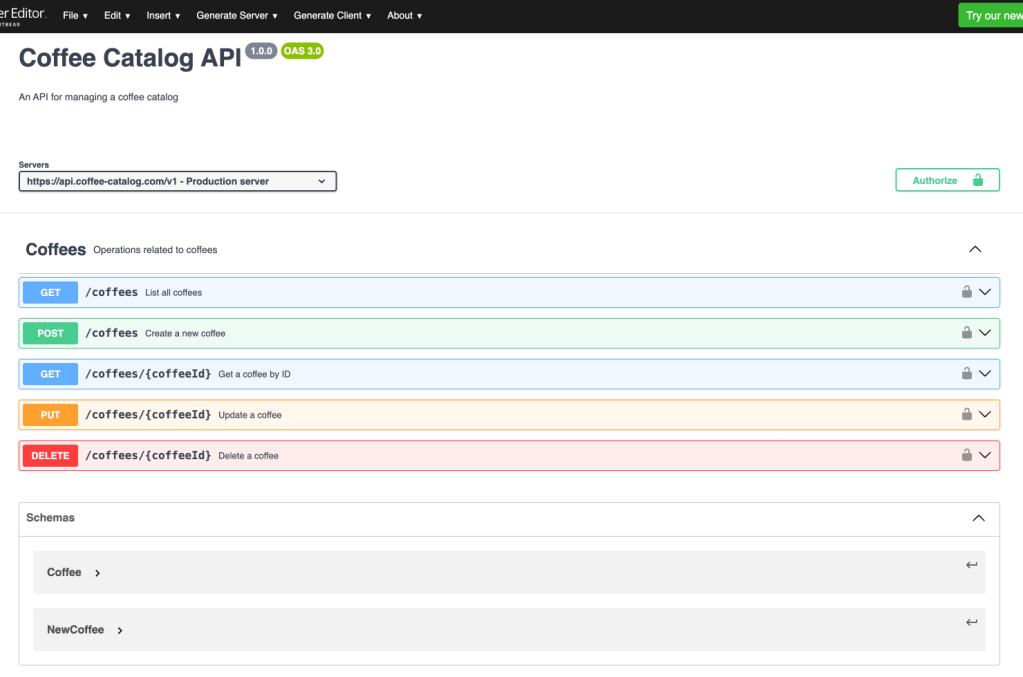
Swagger specification includes information such as:
- Tags: Metadata for organising API endpoints.
- Paths: Endpoints of the API and the HTTP methods supported (GET, POST, etc.).
- Parameters: Inputs the API requires (query parameters, path parameters, etc.).
- Responses: Expected responses and their formats (e.g., JSON, XML).
- Security: Authentication and authorization mechanisms.
SwaggerHub
SwaggerHub is a cloud-based platform for designing and documenting APIs with OpenAPI. With SwaggerHub, you can:
- Reuse object definitions across API definitions using domains to reduce duplication.
- Manage API definitions, including access restrictions, versioning, and integration with source control systems.
- Mock to allow APIs to be tested before implementation is complete.
You can add security to your APIs by selecting a security template for various OAuth flows. Securing your API protects sensitive resources by providing clear authentication and authorization information.
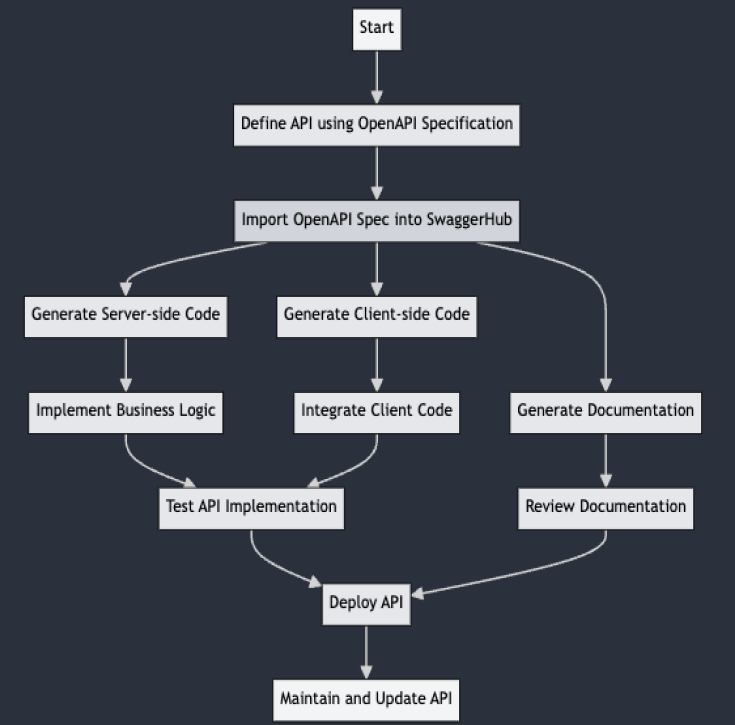
To generate code and documentation, follow these steps:
- Define API using OpenAPI specification
- Import OpenAPI specification into SwaggerHub
- Generate Server-side code and implement business logic.
- Generate Client-side code and implement business logic.
- Generate and review documentation.
- Deploy and maintain the API.
SwaggerHub allows you to version your APIS. This helps you manage different iterations of your API effectively. Ensure each version of your API has up-to-date documentation. SwaggerHub allows you to manage and view documentation for each version separately.
To learn more about Swagger, refer the following:
Swagger vs OpenAPI
Swagger and OpenAPI provide robust frameworks for designing, documenting, and consuming RESTful APIs.
- Swagger offers a suite of tools for interacting with APIs.
- OpenAPI provides the specification that underpins these tools.
Opensouce tools
AsyncAPI
AsyncAPI simplifies defining, managing, and documenting asynchronous APIs in an Event-Driven Architecture (EDA). AsyncAPI helps build asynchronous APIs, much like how OpenAPI standardizes RESTful APIs.
Asynchronous APIs are digital mailboxes where you can send messages without waiting for an instant reply. When the recipient reads and responds, the communication is completed.
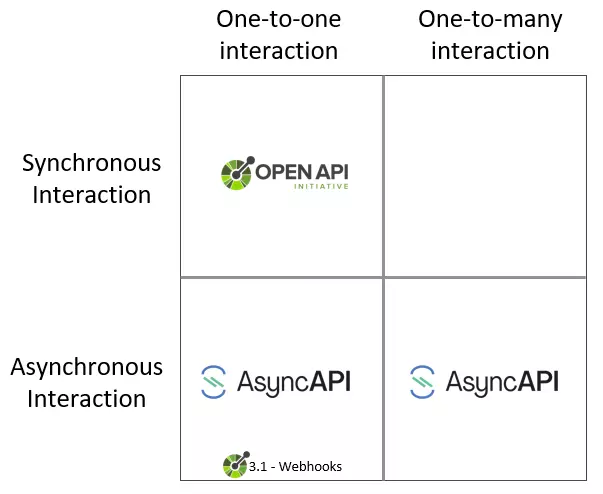
AsyncAPI acts as a contract, formalizing agreements between system components. The agreements focus on message structure, event communication, and channel usage.
Benefits of Using AsyncAPI in EDA Design:
- Describe each event and its corresponding reactions across different components.
- Seamless information exchange between different components. Each component completes tasks independently without waiting.
- Use mock servers to simulate API behavior for testing and development.
- Generate server-side and client-side code for various programming languages.
- Generate interactive documentation from your AsyncAPI specification using the AsyncAPI Generator.
For example, if you are building a real-time chat application.
- Define the channels (topics) for different chat rooms, message formats, and operations (e.g., sending and receiving messages).
- Generate the necessary server and client code to handle chat messages.
- Create mock servers to simulate chat interactions and test the front-end application.
- Generate interactive documentation to help developers understand and use the chat API.
- Integrate AsyncAPI with your CI/CD pipeline to automate testing and deployment.
To learn more about, refer the following:
You can join the Slack community for AsyncAPI to start contributing. Based on my experience contributing during the Google Docs season, they were an excellent organization.
JSON SCHEMA
JSON Schema helps define and validate the structure of JSON data. JSON Schema can benefit your API development by:
- Validating incoming and outgoing requests to your API ensures you receive the expected input and send the correct output.
- Defining reusable schemas for common data structures
- Generating API documentation from JSON Schemas.
- Defining your data contracts using JSON Schema to test your API against a contract.
For example, if you are building a coffee catalog API.
- Use JSON Schema to define the structure of your coffee product data.
- Use the JSON Schema to validate incoming requests to your API. For example, validate that new coffee product data adheres to the schema before adding it to the catalog.
- Generate API documentation from the JSON Schema.
- Generate data models and validation code from the JSON Schema.
- Share the JSON Schema with other teams or services interacting with your API.
To learn more about, refer the following:
You can join the Slack community for JSON Schema to start contributing. Based on my experience contributing, they were an excellent organization.
Thank you for reading this blog. Your feedback is valuable, so please share your thoughts and suggestions. Special thanks to the people below for helping me understand these topics:


 Programmer Prodigy