Container Components
So, if you view your React application as consisting of these two kinds, then implementing your application or at least thinking of how you implement your application becomes more easier.
- Presentational components that are purely responsible for the views,
- Container components that make use of the presentational components in order to construct the overall view of your application.

For more information,
Q.When to use Functional components or Class based components?
If your component is a very simple component and doesn’t require this much of elaborate implementation, there’s a much simpler way of implementing React Components. This simple way of implementing React Components is called as Functional Components.
Functional Component the easier way of doing this is to simply define a JavaScript function that returns either one react element or a collection of react elements too that defines the view that this component is supposed to render. So, a Functional Component is a lot more simpler way of implementing the component where you don’t need a local state, where you don’t need access to life lifecycle hooks. So, this Functional Components simply receives props as it’s parameter. So, within the props all the attributes that we define, all the component will become available within our component, and we can make use of them when they render the views. But the only restriction is that Functional Components cannot have any local state and cannot have access to the lifecycle hooks
function Home(props) {
    return(
      <div className="container">
        <h4>Home</h4>
      </div>
    );
}

For more information,
React Virtual DOM
The Virtual DOM is a React object. The Virtual DOM in React terminology is a lightweight representation of a Browser DOM. Now, since the Virtual DOM is an in-memory object in your React application, the Virtual DOM can be easily manipulated by React whenever it’s required.
So, manipulations are extremely fast compared to manipulating the Browser DOM. When you change anything in the Browser DOM, you need to go and re-render the web page allover again. But the Virtual DOM, since it is maintained in memory by your React application, you can easily make changes to the Virtual DOM.
So, when you have any changes to the state of your components or changes to the props that a component obtains, then that may result in the component being re-rendered. So, this re-rendering is initially done to the Virtual DOM, so any changes are reflected at the Virtual DOM first. And then, after that, we will see how the Browser DOM gets manipulated.
So this Virtual DOM is created completely from scratch every time you call the setState. So, you’ll see that whenever you call setState, you are changing the state with a new React application, which also means that it is possible that some of the props passed into the child components to change, and so the child components may have to be re-rendered.
Every time there are changes to the Virtual DOM and you are at the point of re-rendering the view in the Browser DOM, then to update the DOM, React runs in diffing algorithm. The diffing algorithm identifies the minimum number of components or minimum part of the tree that needs to be updated in order to make the modified version in sync with that Browser DOM.
For example, in a list. You can use the key attribute in the list items in order to indicate which child elements are stable. Indeed, that is the reason when we rendered list, we always supply the key attribute to each list item, and each key attribute was a unique identifier for that particular item in the list. So, when the diffing algorithm works, if it notices that some parts of the list cannot change, they don’t need to be re-rendered. And so, it’ll re-render only those list items that have actually been modified.
React Router
The React Router module, we install it into our React Application and then take the help of the various features provided by the React Router module to enable us to navigate among the views of our application.
yarn add react-router-dom
A React Router is a collection of navigational components. These are React components themselves and these React components enable us to navigate among various views or navigate among various pages. Now, the React Router itself provides larger components than route matching components and a navigation components.
So since we are implementing a web application, we’ll use react-router-dom to implement the react. And this makes available to us a Router component and one of the router components is a BrowserRouter component. So this BrowserRouter component will be applied within one of our components in our application, and this enables the BrowserRouter to provide us with a specialized history object that enables us to navigate among the pages just like the way we navigate among the various pages in a website. If you are using a static file server, then there is a corresponding component called the HashRouter which enables you to do navigations to URLs that contain hashes.
The route matching components include the Route and the Switch. The route component enables us to specify a path property which specifies the current location’s pathname. So, this is the URL part that will be interpreted to represent a particular view. So, each view will be identified by its own URL. And the route components prop, specifies the corresponding view of the application. You could also provide a default by using the redirect components. So, the redirect will specify the default URL to which you’ll be redirected if any of the other parts do not match with any of the routes that you specify within application.
Now, if you have a bunch of routes that you specify, bunch of route components, you group them together using a switch component. So this way, whenever the URLs are navigated to, then this will iterate over all the children to find that particular component or that particular route that matches the URL and then appropriately navigates to that view.
<Switch>
                <Route path='/home' component={HomePage} />
                <Route exact path='/menu' component={() => <Menu dishes={this.state.dishes} />} />
                {/* Pass in parameters in the above statement */}
                <Route path='/menu/:dishId' component={DishWithId} />
                <Route exact path='/contactus' component={Contact} />
                <Route exact path="/aboutus" component={() => <About leaders={this.state.leaders} />} />
                <Redirect to="/home" />
</Switch>
But ideally I would want to have the navigation built into my nav bar here and also to activate these links. So that if I click on them, I will be able to navigate to the various views of my application. So how do we do that? We’ll go into the head of component and configure our nav bar to contain the links that will help me to navigate between the various views of the application.

For more information,
- React Router Documentation
- React Router Dom Documentation
- React Router DOM: set-up, essential components, & parameterized routes
- Basic intro to React Router v4
- A Simple React Router v4 Tutorial
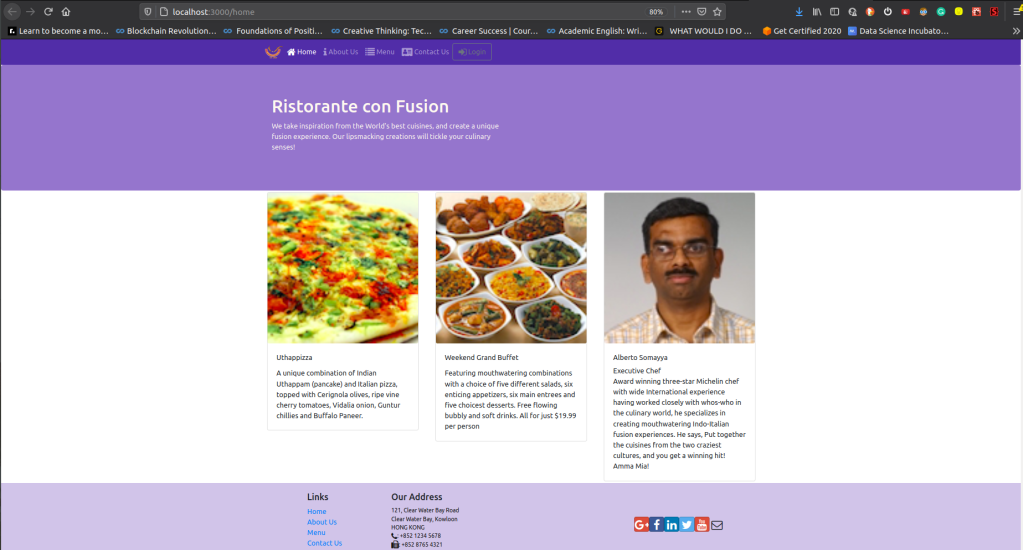
Q.How to pass parameters through the URL, and make use of the parameters in another component in order render the view there.
if you specify a path like that with a parameter starting with a colon, then whatever follows that will be interpreted as a route parameter by React Router.
Now when this happens, this route information, what the route component does, is it passes three pass props to the component which it is rendered. Three props that it passes is called match, location, and history.
<Switch>
        <Route path="/home" component={HomePage} />
        <Route exact path="/menu" component={() => <Menu dishes={this.props.dishes} />} />
         {/* passing parameters in the above route */}
        <Route path="/menu/:dishId" component={DishWithId} />

</Switch>
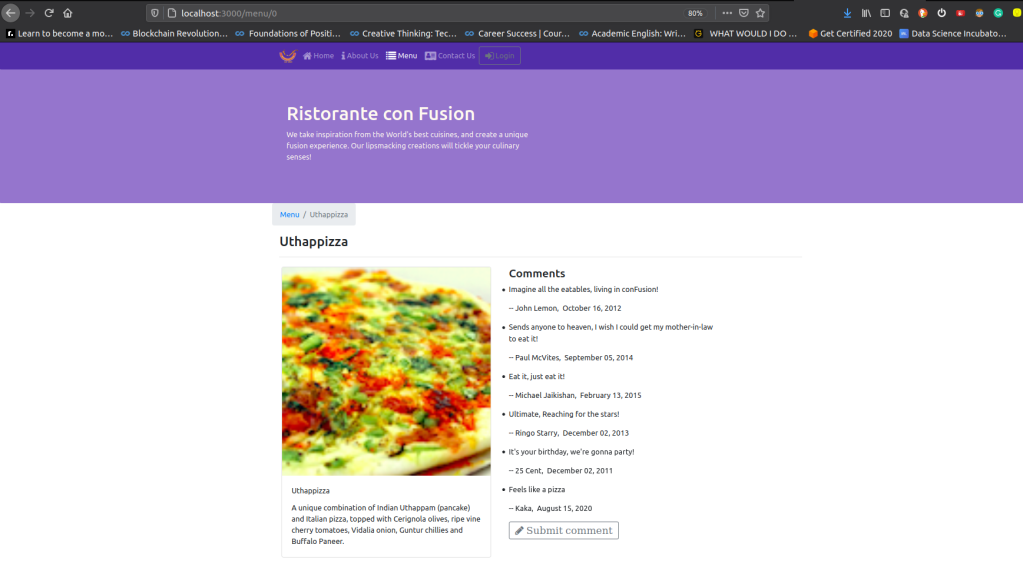
Q.How the match prop can be used to extract the parameter that is passed in the URL?
This match object enables us to determine a path. So, when you specify various route parameters, these become available through the match object as params, which is a propagated gets associated with the match object. So, when you say match.params, you’ll be able to get access to all the params, as a key value pair here. So, each param is associated with a key value pitch. So, params, said if we specified the path as menu:id, then this id will be used as a key and the value.
const DishWithId = ({match}) => {
      return(
          <DishDetail dish={this.state.dishes.filter((dish) => dish.id === parseInt(match.params.dishId,10))[0]}
            comments={this.state.comments.filter((comment) => comment.dishId === parseInt(match.params.dishId,10))} />
      );
    };

 Programmer Prodigy
Thanks for this article, it is totally useful and super informative!
To be honest, normally I choose React Native, it is something quite similar, but there are some important differences between these two languages. It is not only clear and easy to learn but functional as hell! If you want, you can read more about this language here: https://www.miquido.com/blog/is-react-native-the-right-choice-for-your-business/
LikeLike