Database :
In a traditional way :
I would be responsible for everything from power and heating and cooling, racking and stacking the servers, maintaining the servers, so on, all the way up to the application itself.

In EC2 way :
A large section of what you would have to do on-premises, you don’t have to worry about in AWS. You don’t have to worry about provisioning the hardware as far as racking and stacking it, maintaining the server. Even installing the operating system is taken care of by simply running your system on EC2.

Amazon Relational Database service (RDS) :
AWS takes care of all of the rest of the heavy lifting that otherwise your DBA would be in charge of. So no longer does she have to worry about managing the high availability, or managing backups, or taking care of scaling. But all of these pieces now get taken care of because of the Relational Database Service. And the only thing that your DBA needs to worry about is taking care of the application itself.
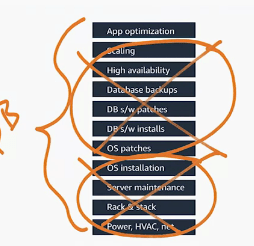
AWS has no access to the data. But all of the rest of the undifferentiated heavy lifting that goes into databases, AWS takes care of. Is RDS the perfect solution for everyone? You certainly may be in a case where you’re using a legacy database. Say you’re still running a Sybase shop, you’ll still run that on EC2. But as you look for ways to eliminate tasks from your team and let them focus on what they really prepare to do, RDS can certainly get rid of large portions that they don’t have to worry about anymore.
- The first question you get asked is what type of database do you want to launch ?, Whichever flavor it is, we’ve got the options here, including the Amazon Aurora database, which is a MySQL-compatible engine that is designed to work cloud-native, meaning it’s going to give you more power at less cost all native inside your VPC.
- If I’m using a MySQL database for a developer, I’m not worried about high availability. In that case, because a Multi-AZ strategy costs more, I’d absolutely go with the Dev option. But in this case, we’re going to be launching a production database. So by choosing the Production-MySQL, it’s going to automatically give us that Multi-AZ option. Now that we’re here inside the details, we can of course choose which database engine version you want, and there’s a wide range of different MySQL versions Amazon supports.
- You’ll see an option to choose a license model, but in MySQL, there is simply the general license that’s available. For some of our other flavors, you might have the option to bring your own license, or the special licensing agreements that you need, or use the pay-as-you-go option that comes with AWS.
- Additional options will be how large of a database do you want to start with, and this of course can be changed. If you want to start with a small database and then as demand grows, change it over time, that absolutely is one of the benefits of RDS.
- Now, we now can choose some settings that are specific to your database. This is going to be your initial login settings with the master username and password it’s going to be. Of course, Amazon recommends, that you change this once you get logged in, so there’s no concerns about anyone else but you having the master password.
- Now we simply choose which VPC, which subnet group, and we’re just going to go ahead and take the defaults out of this. Public accessibility? No, I don’t want this public. This is going to be my private database with a front-end instance. As far as anything else, what security groups we want? What individual database options?
- I absolutely want encryption. So in this case, we’re going to leave the default to Enable encryption.
- As far as backups go, you set up how often you keep the backups and how long you keep the backups.
- Monitoring, enhanced monitoring is going to give me additional information.
- Performance insights, all these options as default.
- On our maintenance contracts for AWS, we want to know if we want to enable minor version upgrades. Do we want to stay on this version, so it doesn’t automatically upgrade?
- And finally, Deletion protection, I absolutely want this one checked. I don’t want someone accidentally or inadvertently sending a delete command and having it accepted.
Amazon RDS is eligible for the AWS Free Tier. More details on pricing for Amazon RDS are available here: https://aws.amazon.com/rds/pricing/
Relational databases allow for medium to high amount of throughput and require rigid schemas to be in place. But what if you need massive amounts of throughput, but keep that low latency? Or what if your data model was simple enough, and you didn’t require the transaction-al support that relational databases had to offer? You might look into using a No-SQL database instead. Introducing Amazon DynamoDB.
Dynamo db :
DynamoDB is a fully managed, fast, and scalable No-SQL database solution that delivers reliable performance at any scale.
When you start using DynamoDB, you do not have to manage any of the underlying infrastructure running that database. When you need to start using DynamoDB,
- you simply create a table, define your throughput needs, and you can start populating it with your data.
- To compare this with Amazon RDS, with RDS when you need to use it, you define how much capacity you need in terms of memory and CPU.
- So you’re defining the underlying hardware that we’re running your database on. With Dynamo, you simply just tell us how much you need talk to that table by provisioning your throughput needs.
- With Amazon DynamoDB, you can start small, specify the throughput you need, and easily scale your capacity requirements in seconds, as needed.
- It automatically partitions data over multiple servers to meet your requested capacity. As your data grows, AWS handles the management of scaling your database. There is no limit on table size, which means you can store any amount of data.
- DynamoDB synchronously replicates your data across three facilities in an AWS Region to ensure redundancy and availability. So you’re protected from any chaos caused by any events that would temporarily disrupt connections to an Availability Zone
For more information, https://aws.amazon.com/dynamodb.

 Programmer Prodigy
One thought on “AWS Fundamentals: AWS Cloud-Native”