An assembly language is the most basic programming language available for any processor. With assembly language, a programmer works only with operations that are implemented directly on the physical CPU.
It makes possible to manipulate hardware directly, address critical issues concerning performance and also provide access to special instructions for processors. Uses of assembly language include coding device drivers, real-time systems, low-level embedded systems, boot codes, reverse engineering and more.
Why Hexadecimal?
Hexadecimal (base 16 – 0 1 2 3 4 5 6 7 8 9 A B C D E F) is used as a shortcut notation for binary numbers (0 1) because it works out nicely for 8, 16, 32, and 64 bit processors. You can represent all binary numbers with each set of 4 bits as 1 hex character A=1010, B=1011, F = 1111, 0 = 0000, 7 = 0111, etc.
Compilers of languages and even down to assemblers can instantly decode hex numbers to binary numbers and send them as data or cpu instructions into the cpu or to memory.
Directives/Instructions in assembly language
1.MOV destination,source :
- destination and source cannot both be memory locations , as the must be of same type.
- it does not affect a flag
MOV CX, 037 AH ->put value of 037A H to CX
MOV BL, [437 AH]->copy byte in DS at offset 437 AH to BL
MOV AX,BX -> copy content of register BX to AX

MOV n1,n2 -> where n1 and n2 are variable is not allowed
2.LEA(load effective address ) register,source:
- This instruction determines the offset of the variable or memory location named as the source and puts this offset in the indicated 16-bit register.
- It does not affect any flag
- It is used when you don’t want the value but the address of the source
- the ability to store the result in any register; not just one of the source operands.
https://stackoverflow.com/questions/1658294/whats-the-purpose-of-the-lea-instruction
3.CMP destination,source:
- compare a byte/word in source with the specified destination.
- source can be a number ,register or a memory location, however source and destination both can’t be memory location.
- compassion is done by subtracting the source byte/word from destination byte/word.
- Flags are used to indicate the result , AF, OF, SF, ZF, PF, and CF are updated by the CMP.
CMP BH,BL ->compare byte in cl with byte in bh
4.ROL destination,count:
- This instruction rotates all the bits in a specified word or byte to the left some number of bit positions. The data bit rotated out of MSB is circled back into the LSB.
- To rotate more than one bit position ,load number into CL and then continue it .
- Carry Flag is used
ROL AX,1 -> Rotate the word in AX 1 bit position left,
MSB to LSB and CF

MOV CL, 04H -> Load number of bits to rotate in CL ROL
BL, CL Rotate BL 4 bit positions

ROL WORD PTR [BX], CL Rotate word in DS at
offset [BX] 8 bit position left
5.ROR destination,count:
- some number of bit positions to right. The operation is desired as a rotate rather than shift, because the bit moved out of the LSB is rotated around into the MSB. The data bit moved out of the LSB is also copied into CF.
- To rotate more than one bit position ,load number into CL and then continue it .
- Carry Flag is used
ROR BL, 1 -> Rotate all bits in BL right 1 bit position LSB
to MSB and to CF

MOV CL, 08H -> Load CL with number of bit positions to
be rotated

ROR WORD PTR [BX], CL Rotate word in DS at
offset [BX] 8 bit position right
6.JC (Jump if carry):
- if after a instruction , the carry flag is 1 ,then it will cause execution to jump to a given label .
- if cf=0 , then normal flow
JC NEXT -> Jump to label NEXT if CF = 1.
7.JMP (jump):
- change flow of execution of instruction in the processor to a particular instruction
- There are two types of jump instructions ,
A.Unconditional jump instruction -> if you jump without any condition to fulfill ,there are three types of procedures
- NEAR:targets within same code segment
- SHORT:also within same code segment, but the offset is 1 byte long( intra segment).
- FAR:target is outside the segment and the size of the pointer is double word .
Syntax:
JMP procedure_namememory_location

Example:
JMP short target
B.Conditional jump instruction->if you want to jump only if a condition is checked , similar to if condition.
The ALU operations set flags in the status word (Flag register). The
conditional jump statements tests the flag and jump is the flag is set. A few examples would be ,
- JC (jump if carry ): if cf=1 ,then jump
- JNC (jump if not carry):if cf =0,then jump
- JE/JZ (jump if equal or jump if Zero): if Zero flag =1, then jump
- JNE/JNZ(jump if not equal or jump if Not Zero): if ZF=0, then jump
- JP/JPE(jump if parity or jump if even parity): if Parity flag=1,then jump
- JNP/JPO(jump if not parity or jump if odd parity):if PF=0, then jump
8.AND destination ,source :
- This instruction ANDs each bit in a source byte or word with the same numbered bit in a destination byte or word. The result is put in the specified destination.
- source can be a number, content of a register /memory location.
- both source and destination cannot be memory locations
- AND. PF, SF, and ZF are updated by the AND instruction. AF is undefined. PF has meaning only for an 8-bit operand.
AND CX, [SI] -> AND word in DS at offset [SI] with word in CX register; Result in CX register

AND BH, CL -> AND byte in CL with byte in BH; Result in BH
9.CALL : When ever we need to call a procedure or a sub program,steps are
- The address of the next instruction that exists in the caller program (after the program CALL instruction) is stored in the stack.
- The instruction queue is emptied for accommodating the instructions of the procedure.
- Then, the contents of the instruction pointer (IP) is changed with the address of the first instruction of the procedure.
- The subsequent instructions of the procedure are stored in the instruction queue for execution.
CALL subprogram_name
10.RET : used at the end of the procedures or the sub programs to transfer the execution to the caller program. Steps taken are,
- The address of the next instruction in the mainline program which was previously stored inside the stack is now again fetched and is placed inside the instruction pointer (IP).
- The instruction queue will now again be filled with the subsequent instructions of the mainline program.
RET
11.MACRO : a set of instructions grouped under a single unit , somewhat like procedure programming .
Macro is a sequence of instructions that are written within the macro definition to support modular programming. On the other hand, a procedure is a set of instructions that performs a specific task, and a programmer can call it repetitively.
Now in simple terms , when you call a MACRO the entire code gets copied to that place , as if the code was present there. It does not use extra memory it does not return a value .
Syntax for a MACRO in 8086,
Macro_name MACRO [ list of parameters ]
Instruction 1
Instruction 2
- - - - - - - - - - -
- - - - - - - - - - -
- - - - - - - - - - -
Instruction n
ENDM
How to call the MACRO ,
Macro_name [ list of parameters]
Macro avoids the overheard time involved in calling and returning , no need for providing separate memory
12.Model small
.Model directive affects the entire module , it appears before any other segment directive in source file.
- memory model
- calling and naming conventions
- operating system
- stack type
- it enables use of simplified segments
- name of code segment
- default distances for procedures
The memory model can be TINY, SMALL, COMPACT, MEDIUM, LARGE, HUGE,
or FLAT, it determines size of code and data pointers.
13.Code :
it instructs the assembler to start a code segment ,End directive at end of your program closes the directives. With near code, the assembler names every code segment _TEXT,
.MODEL SMALL
.DATA
N1 db 04h;variable
.CODE;default name _text
MOV ax,@data
MOV ds,ax
MOV al,n1
MOV ah,01h
INT 21h
END
14.Data :
specifies the data space of your program , as in for variables
.data
N1 db 06h
In order to use data space in your program , you must initialize the DS segment register to the address of the data segment , you do it indirectly by
MOV AX, @data; Address of data segment
MOV DS, AX
@data is a reserved word , causes assembler to calculate the correct DS segment value.
15.END :
- The END directive is put after the last statement of a program to tell the assembler that this is the end of the program module
16.INT 21 h:
you are using function 01h of the interrupt type 21, where 01 h is to read character from the standard input , it is stored in AL
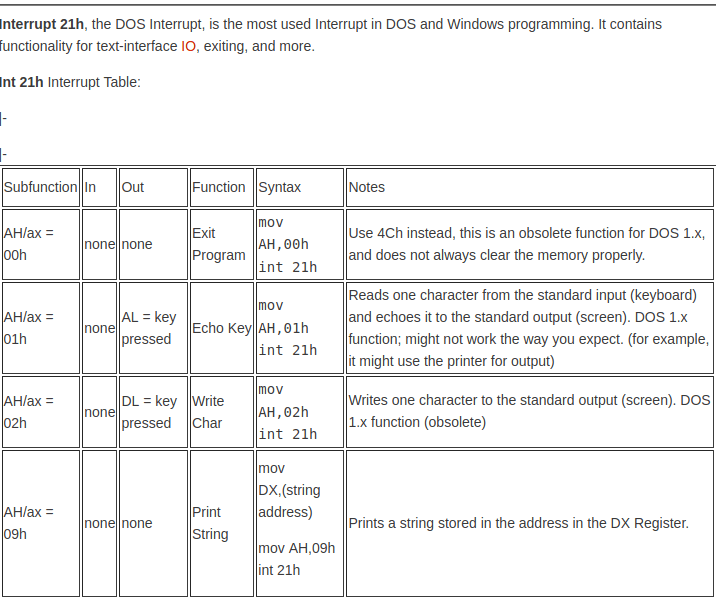
int 21h means, call the interrupt handler 0x21 which is the DOS Function dispatcher. the “mov ah,01h” is setting AH with 0x01, which is the Keyboard Input with Echo handler in the interrupt. See:
http://spike.scu.edu.au/~barry/interrupts.html
17.PROC :
- Used to identify the start of a procedure
Syntax for declaring the procedure is ,
Name PROC FAR/NEAR
Here far / near tell the location in the memory
Add PROC NEAR
ADD AX,BX
MOV CX,AX
RET
Add ENDP
PROC directive stores the contents of the register in the stack.
Pointer is stored, memory is utilized otherwise in macro the pointers are not stored .
18.ENDP (End Procedure ):Used to end the procedure ,
SQUARE_ROOT PROC -> Start of procedure.

SQUARE_ROOT ENDP -> End of procedure.
for knowledge on programming in assembly language , go through
https://programmerprodigy.code.blog/2020/05/06/assembly-code/

 Programmer Prodigy