Modern Kubernetes environments evolve rapidly, containers start and stop within seconds, workloads scale dynamically, and network connections shift constantly. Traditional firewalls and intrusion prevention systems aren’t designed for this.
NeuVector is an open-source, Kubernetes-native container security platform that helps automate defense across these dynamic environments. It enforces a Zero Trust model at the container level and integrates directly into your DevSecOps pipeline.
This article explains how NeuVector manages vulnerability and compliance across the entire container lifecycle, from image build to runtime. It focuses on how NeuVector integrates with your CI/CD pipeline, continuously updates its vulnerability database using the Updater component, and enforces compliance through admission control and CIS benchmark checks.
Containerized apps with NeuVector
Containerized applications introduce challenges that can’t be solved by traditional endpoint or network security:
- Containers communicate over ephemeral internal networks.
- Images from public registries might include known vulnerabilities.
- Runtime behavior is dynamic, threats can hide in normal-looking traffic.
- Compliance checks are often manual and disconnected from pipelines.
NeuVector addresses these problems using runtime visibility, policy automation, and continuous compliance, all built for Kubernetes.
Securing the Container Lifecycle
NeuVector integrates security into each phase of the DevSecOps pipeline, automating checks and blocking risks across your pipeline before they reach production.
| DevSecOps Phase | Problem Solved | NeuVector Feature |
| Build | Early identification of known software supply chain risks. | Vulnerability Scanning of images and base layers using up-to-date CVE databases. |
| Deploy | Preventing vulnerable or non-compliant images from entering the cluster. | Admission Control validates deployment YAMLs and scans pre-deployment to block risks (e.g., high CVE count, running as root). |
| Run | Continuous validation of running workload compliance against mandates. | CIS Benchmarks (Kubernetes, Docker, OpenShift, GKE) and Custom Compliance Checks (scripts) are run automatically on nodes and containers. |
Stopping Run-time Threats
The most significant gap in container security is protecting workloads during run-time. NeuVector’s primary mission is to enforce Zero Trust microsegmentation based on learned application behavior.
Deep Packet Inspection (DPI) & Threat Detection:
NeuVector inspects network traffic up to Layer 7 (application protocol level), moving beyond simple IP and port rules.
This enables automatic detection and blocking of sophisticated attacks, including DDoS (Ping Death, SYN flood, HTTP Slowloris), tunneling (DNS, ICMP), SQL injection, and specific Kubernetes threats like the Man-in-the-middle attack

East–West Traffic Control:
By automatically learning and whitelisting legitimate network connections and processes for each application group, NeuVector effectively segments East–West (container-to-container) traffic. Any traffic or process execution that violates the established “normal” baseline is immediately detected (Monitor mode) or blocked (Protect mode).
Process and File Integrity:
The Zero-drift process and file protection feature is enabled by default for application groups.
This security model automatically allows only those processes that originate from the original container image, offering robust defense against unauthorized file updates or process injection, effectively hardening the workload.
For example, if a compromised container tries to run unauthorized commands (for example, /bin/bash in a Node.js container), NeuVector blocks it immediately.
How NeuVector Helps Containerized Solutions
NeuVector integrates natively with CI/CD pipelines to embed security directly into development workflows, reducing context switching and ensuring continuous feedback.
For example, consider a Coffee Shop application with three microservices order, payment, and inventory.

NeuVector ensures each service communicates securely and remains compliant. Also, it detects and blocks unauthorized traffic between microservices, protecting against lateral movement and API abuse.
CI/CD Integrations
NeuVector offers plugins and REST APIs to embed security directly into developer workflows, minimizing context switching and enabling rapid feedback loops.
- Jenkins & Build Tools: The NeuVector Vulnerability Scanner Jenkins plugin supports triggering image scans locally on the Jenkins machine or remotely against a registry (Controller & Scanner mode). Similarly, extensions exist for Azure DevOps, GitLab, and GitHub Actions to fail builds if vulnerability thresholds are exceeded.
- Policy as Code (CRD): Security policies (Network, Process, File, Admission Controls, WAF/DLP) can be exported from NeuVector as Kubernetes Custom Resource Definition (CRD) YAML files. This enables security rules to be managed, versioned, and migrated (Policy Migration) between staging and production environments using standard GitOps practices.
- Fleet and GitOps: You can automate policy propagation between clusters using Rancher Fleet. For more information, refer to Microservices at edge with k3s and Fleet.
Reducing Compliance Overhead
NeuVector simplifies reporting and auditing by providing compliance profiles for industry standards.
- Audit Automation: Compliance checks, including CIS Benchmarks for platforms like Kubernetes, Docker, Red Hat OpenShift, and Google GKE, are run automatically. These checks cover aspects like configuration, host security, and auditing for over 40 types of secrets within images and containers.
- Compliance Reports: Results can be tagged against and filtered by templates for regulations such as PCI, GDPR, and HIPAA, allowing users to generate customized reports directly from the Security Risks menu.
Architecture & Components
NeuVector’s modular architecture consists of several specialized containers, primarily designed to be deployed using DaemonSets and Deployments across a Kubernetes cluster.

Different components in NeuVector architecture:
| Component | Role | Functionality | Default Ports (Inbound/Listening) |
| Controller | Control Plane & Orchestration | Manages Enforcers, centralizes policy (state sync), coordinates scanning, processes REST API calls, and hosts the Admission Control webhook. | 18300 (RPC), 10443 (REST API). |
| Enforcer | Data Plane & Runtime Security | Deployed on every protected node, it intercepts network traffic (DPI), monitors processes/files, and applies protection policies (Monitor/Protect modes). | 18301 (Cluster LAN). |
| Manager | User Interface (UI) | Stateless container providing the Web UI console (port 8443) and managing user sessions. | 8443 (Web Console). |
| Scanner | Vulnerability Management | Performs image, container, node, and platform vulnerability scans using the CVE database. Multiple replicas can be deployed for scaling. | Communicates internally via Controller ports. |
| Updater | CVE Database Maintenance | Runs as a Kubernetes cron job to trigger redeployment of the Scanner, forcing a pull of the latest image containing the updated CVE database. | None (Cron Job) |
| All-in-One | Simplified Deployment | Combines the Manager, Controller, and Enforcer functions into a single container. Primarily used for testing or Docker Native/Swarm deployments. | 8443, 18300, 18301, 18400, 18401 (combined ports). |
For example, consider a coffee shop microservices application with services such as:
- orders (handles incoming customer orders)
- payments (processes payments)
- inventory (manages stock levels)
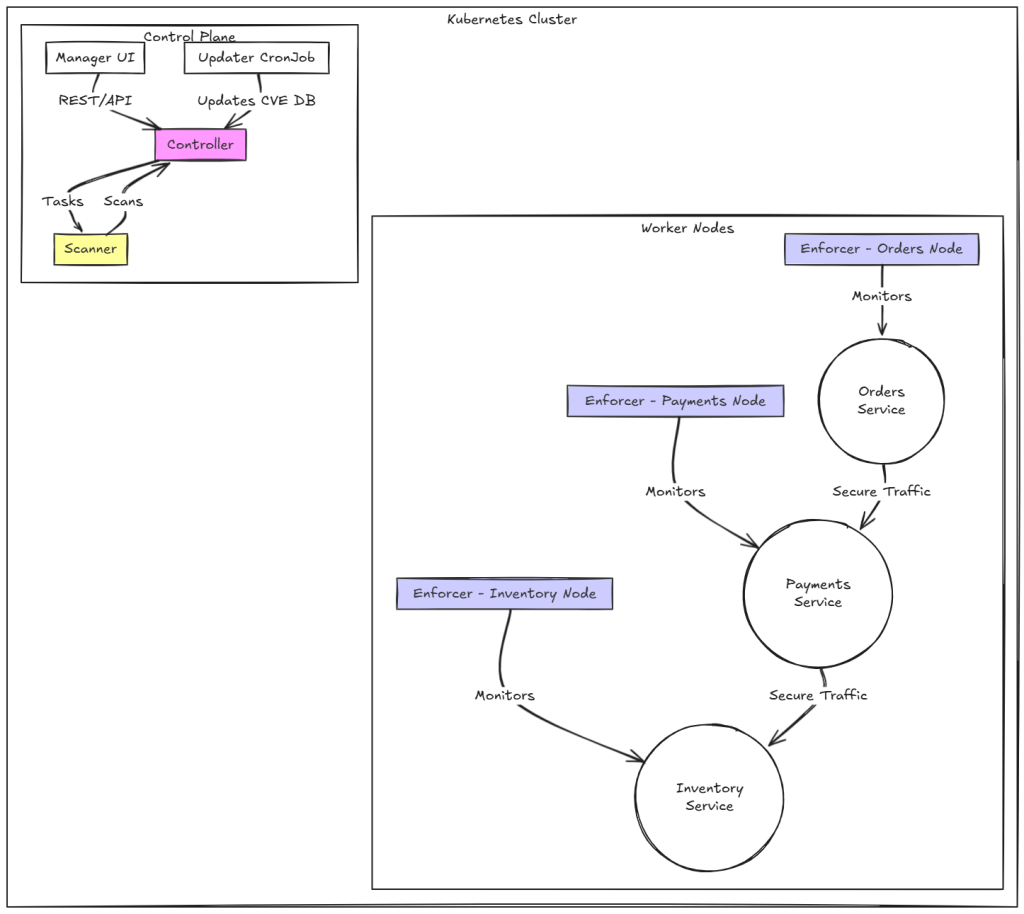
Here’s how the components interact to secure your application:
- Deployment Phase: When a new version of the orders service is deployed, the Controller triggers an Admission Control webhook to verify if the container image meets policy requirements (for example, no critical CVEs).
- Runtime Monitoring: Once deployed, the Enforcer on that node begins monitoring network traffic. If the orders service suddenly tries to contact an external endpoint (like an unauthorized payment gateway), NeuVector can block that traffic in Protect mode.
- Continuous Vulnerability Scanning: The Scanner regularly scans images pulled from your internal or public registries (for example,
ghcr.io/coffee-shop/orders:v2.0). The Updater ensures the CVE database stays current. - Visibility and Reporting: The Manager UI shows a real-time topology of how your services communicate, like Orders → Payments → Inventory. So you can visualize and fine-tune policies.
Multi-Cluster / Federation
For enterprises managing numerous Kubernetes clusters (multi-cloud, hybrid, or edge), NeuVector supports a Federation model. One cluster is promoted to the Primary (Master) role, and others join as Remote (Managed/Worker) clusters.
- Centralized Policy Management: The Primary cluster can define and push Federated Rules down to all joined Remote clusters. These rules appear as “Federated rules” in the Remote cluster consoles, ensuring consistent security posture across the organization.
- Distributed Scanning Efficiency: The Primary cluster can scan centralized registries (designated as Federated Registries). The resulting scan data (vulnerabilities) is then automatically synchronized to all Remote clusters. This eliminates the need for every downstream cluster to rescan the same registries, significantly reducing CPU/memory and network bandwidth consumption.
- Deployment Note: There must be network connectivity between the Controllers in each cluster on the required ports for federation to function.
Planning & Deployment
The recommended deployment method for Kubernetes environments is using the NeuVector Helm chart. This supports platforms like standard Kubernetes, RKE2, and K3s. Helm allows you to declaratively manage configurations, apply upgrades, and customize component placement through values.yaml.
Node Placement and Scheduling
Proper scheduling ensures NeuVector’s stability, performance, and resilience across your Kubernetes environment. Careful placement using Kubernetes scheduling features is crucial for stability and resource management.
- Enforcer Placement: The Enforcer should be deployed via a DaemonSet on every host/node where application containers are running, including master or infra nodes if they host workloads to be monitored.
- Controller Placement (HA): Deploy three Controllers (an odd number is required for leader election) for High Availability (HA). Controllers are critical, and customers often place them on dedicated management nodes or master nodes using Taints and Tolerations.
- Manager/Scanner Placement: These can run on any node, but often share space with Controllers. Node selectors and affinities in the Helm chart can control deployment locations.
In the Coffee Shop application, each node hosting orders, payments, or inventory services gets an Enforcer pod:

Note: Use node labels and taints to ensure Enforcers schedule only where workloads run (nodeSelector, tolerations).
Critical Deployment
- Persistent Storage: For HA and configuration recovery from total cluster failure, it is crucial to configure a ReadWriteMany (RWX) Persistent Volume Claim (PVC) (1Gi or more) to store configuration and policy backups at /var/neuvector/ on the Controller/Allinone node.
- Without persistent storage, configuration and policy data will be lost if all Controllers go down.
- Certificate Requirement (5.4.2+): For NeuVector versions 5.4.2 and later, hardcoded internal certificates are no longer supported. Users must generate and mount new internal certificates (ca.crt, tls.key, tls.crt) to the Controller, Enforcer, and Scanner pods via a Kubernetes secret before deployment.
- Helm automatically mounts this secret into Controller, Enforcer, and Scanner pods.
Note: NeuVector versions prior to 5.4.2 must also have users generate and replace internal certificates after March 2025
Scaling Considerations
Scaling NeuVector involves balancing security depth (Protect Mode) with cluster performance and resource budgets.
| Scaling Factor | Impact on Resources | Mitigation/Best Practice |
| Protect Mode | Enforcer runs as an inline firewall, requiring more CPU and memory for DPI and blocking. This is the main performance factor. | Allocate dedicated CPU core(s) and increase memory (1GB minimum) to the Enforcer container for high network throughput or latency-sensitive workloads. |
| Registry Scanning | Scanning large images (over 1GB) requires sufficient memory in the Scanner pod to pull and expand the image. | Scanner memory must be provisioned higher than the largest image size + 0.5GB. Deploy multiple Scanner pods in parallel to increase capacity for thousands of images. |
| Cluster Size | Communication traffic from Enforcers to Controllers collectively increases. | Practical difficulties may be experienced in clusters exceeding 500 nodes; optimizations may be required. |
| Workloads (Pods/Groups) | High pod density requires more resources for the Enforcer to gather security/compliance data. Large workload environments may require adjusting system scaling constraints (e.g., fs.file-max) on the host OS. | Ensure adequate minimum CPU/memory requests are set for NeuVector components. |
Below is an example of a federated setup where NeuVector secures multiple clusters of the Coffee Shop app, one for production and one for staging.

Compliance & Vulnerability Management
NeuVector provides an integrated vulnerability and compliance framework that operates from image build to runtime. This ensures that only secure workloads are deployed and continuously monitored for compliance across Kubernetes environments.
NeuVector continuously updates its vulnerability scanning intelligence through the Updater component.
- Nightly CVE Updates: The Updater container automatically fetches the latest CVE database each night.
- Scanner Image Refresh: NeuVector regularly publishes new Scanner images that include updated vulnerability definitions.
- Automated Scanner Rollout: When a new scanner version is available, the Updater redeploys all Scanner pods by briefly scaling their deployment to zero, then back up again. This forces Kubernetes to pull the latest image automatically, ensuring the most recent CVE data is always in use without manual intervention.
This mechanism keeps all image, runtime, and node scans aligned with the latest known vulnerabilities.
Vulnerability Scanning
NeuVector performs vulnerability scans across all stages of your CI/CD pipeline and infrastructure:
- Registry Scanning: Scans container images in registries such as Docker Hub, Harbor, AWS ECR, Azure ACR, OpenShift, and GitHub Container Registry (GHCR).
- Build-Phase Scanning: Integrates with CI tools like Jenkins, GitLab CI, and Azure DevOps to scan images during build.
- Runtime and Node Scanning: Detects vulnerabilities in active containers and host nodes, including OS-level and package vulnerabilities.
NeuVector correlates all scan results in the Security Risks dashboard, offering a single view of your cluster’s security posture.
Admission Control
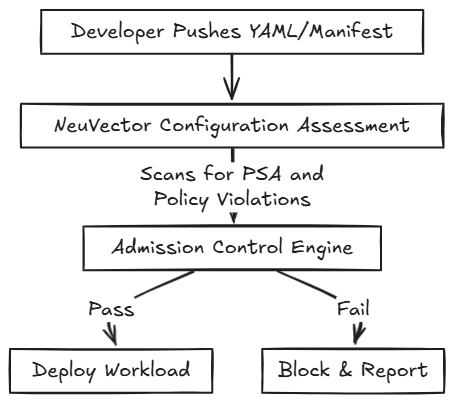
NeuVector’s Admission Controller acts as a policy-driven gatekeeper for Kubernetes deployments. It validates workloads before they are admitted to the cluster and enforces deployment security policies.
It denies deployments containing:
- Images with a high number of known CVEs (with available fixes).
- Unsigned or unscanned images.
- Workloads violating Pod Security Admission (PSA) policies (for example, privileged containers).
In the Coffee Shop app, if the order-api image includes a high-severity CVE, NeuVector’s Admission Controller blocks deployment in Protect mode, logging an event for developer review.
Admission control rules operate strictly in two modes:
| Monitor | Protect |
| Alerts users of any anomalous behaviour | Blocks anomalous behavior |
| Detects run time violations of your security policy | Blocks any network that are detected |
| No rules are created by NeuVector, although they can be manually added anytime | No rules are created by NeuVector although they can be manually added anytime |
| Recommended for Production environments | Recommended for Production environments |
Discover mode is not an enforcement mode for Admission control, but is used for learning and identifying network connection between containers. It automatically builds a whitelist of network rules to protect normal behavior. Typically used in Dev/Staging environments
Managing Compliance and CIS Benchmarks
NeuVector automates compliance verification using built-in and custom benchmark templates.
Supported CIS Benchmarks:
- Kubernetes
- Docker
- Google GKE
- Red Hat OpenShift (draft benchmark inspired by CIS)
Key features:
- Automatically runs CIS checks for supported platforms.
- Offers compliance templates for PCI-DSS, GDPR, and HIPAA.
- Centralizes results in the Security Risks and Compliance dashboards for reporting and remediation.
- Enables pre-deployment checks by uploading deployment YAML files under Policy → Admission Control → Configuration Assessment → Test.
This identifies policy violations before workloads are deployed.
Monitoring and Managing Vulnerabilities
NeuVector provides multiple interfaces and APIs to manage vulnerabilities and compliance across your workloads:
- Dashboard: Displays a Security Risk Score that reflects workload posture using metrics like ingress/egress risk, privilege escalation, admission control violations, and CVE count.
- Assets Menu: Shows vulnerability and compliance results for registries, nodes, and containers.
- Security Risks Menu: Consolidates registry, node, and container scan results along with compliance checks for unified reporting.
- Notifications → Risk Reports: Displays historical scan events and remediation trends.
- Response Rules: Automate actions such as sending webhooks, triggering alerts, or quarantining containers based on scan results.
- REST API: Enables automation of scan triggers, policy queries, and result collection.
- SYSLOG and Webhook Alerts: Stream alerts and scan results to SIEM tools like Splunk or Elasticsearch for enterprise integration.
Supported Environments
NeuVector supports and is validated across multiple Kubernetes distributions:
- Public Cloud: Amazon EKS, Azure AKS, Google GKE.
- Enterprise: Red Hat OpenShift, Rancher RKE2, and K3s.
For Docker Swarm or Native Docker, NeuVector can be deployed as an All-in-One container. However, Kubernetes-dependent features, such as Admission Control, CRDs (Policy as Code), and automated rolling updates aren’t available in these environments.
Example Coffee Shop CI/CD Pipeline
Let’s use the Coffee Shop microservices example to understand how NeuVector enforces security throughout the deployment lifecycle.

Imagine a CI/CD pipeline for the coffee-order-service container:

Step-by-Step Workflow
- Code/Image Pushed: A developer pushes an updated coffee-order-service image to GitHub Container Registry (GHCR).
- Build Phase (Scan Triggered): Jenkins triggers a NeuVector Scanner to analyze the image for vulnerabilities and configuration risks.
- Evaluate Scan Results: The NeuVector Controller receives the scan report.
- If more than five High CVEs with known fixes are detected, a policy violation flag is added.
- Deploy Phase (Admission Control)
When Kubernetes receives the deployment manifest, it invokes NeuVector’s Validating Admission Webhook. The Controller checks the image’s risk profile against Admission Control policies. - Deny or Deploy:
- Deny: If the policy is in Protect mode, deployment is blocked. The coffee-order-service container never runs.
- Allow: If compliant, Kubernetes proceeds with the deployment.
- Run Phase (Runtime Protection): Once deployed, the NeuVector Enforcer applies runtime behavioral policies, ensuring the coffee-order-service communicates only with allowed services (like payment and order-db) using defined network rules.

Best Practices
- Automate scans in CI/CD: Integrate NeuVector scanners into Jenkins, GitHub Actions, or GitLab CI pipelines.
- Use signed images: Enforce container image signing and verification through Admission Control.
- Regularly update CVE database: Schedule Updater jobs to ensure the Scanner uses the latest vulnerability data.
- Centralize policy management: Use Federation mode for consistent Admission Control and scanning policies across clusters.
When NeuVector is the Right Choice
NeuVector is most effective in dynamic, large-scale Kubernetes environments where frequent scaling, application updates, and security automation are required.
Key Advantages
- Kubernetes-Native Security: Integrates directly with Kubernetes APIs to protect workloads at every stage of the lifecycle.
- Adaptive Security Policies: Automatically updates declarative network and process policies as deployments scale or change.
- Centralized Federation: Provides unified visibility and policy control across multi-cluster environments.
- Broad Platform Support: Validated on EKS, AKS, GKE, and Red Hat OpenShift; includes support for GKE CIS Benchmarks.
- Behavioral Learning: In Discover mode, NeuVector builds a whitelist of expected network, process, and file activities for each service group.
- Zero-Drift Protection: For hardened containers, NeuVector enforces a strict allow-list of processes based on the parent image to prevent unauthorized changes.
- Compliance Automation: Automatically runs CIS Benchmarks for Kubernetes, Docker, OpenShift, and GKE, and supports reporting for PCI, GDPR, and HIPAA.
- Shift-Left Security: Integrates into CI/CD pipelines to detect vulnerabilities early and enforce policy compliance.
- Admission Control: Blocks insecure deployments based on configurable rules, such as high CVE counts, unsigned images (Sigstore/Cosign), or PSA violations.
- Policy as Code: Exports discovered security rules (Network, Process, DLP/WAF, Admission Control) as CRDs for versioning and GitOps workflows.
- Build-Phase Scanning: Integrates with CI tools like Jenkins, Azure DevOps, GitHub Actions, and CircleCI to fail builds if vulnerability thresholds are exceeded.
When Not to Use NeuVector
NeuVector’s comprehensive protection introduces some architectural overhead that may not be necessary in all environments.
- If you’re managing fewer than five nodes or rarely update workloads, NeuVector’s distributed architecture may be excessive.
- Operational Overhead: Running multiple components (Controller, Enforcer, Manager, Scanner) can be complex for small clusters.
- HA Requirements: Highly available Controller setups typically need at least three nodes.
- In Docker Native or Swarm setups, key Kubernetes-dependent features like Admission Control, CRDs, and automated deployment are unavailable.
- For such environments, use the All-in-One container for limited protection without full platform features.
- NeuVector’s Zero Trust model requires time to review and approve learned behaviors:
- Policy Validation: Moving workloads from Discover → Monitor → Protect demands ongoing review of security events.
- Operational Complexity: Advanced response rules (e.g., quarantining a container upon CVE detection) require security expertise to maintain safely.
Conclusion
NeuVector delivers a comprehensive, automated approach to vulnerability and compliance management for Kubernetes environments. Its Updater container ensures your scanners stay current with the latest CVEs, while its admission control prevents insecure or noncompliant workloads from being deployed.
With multi-stage scanning, CIS benchmark validation, and built-in integration options for Jenkins and GitLab. Whether you’re a product manager evaluating enterprise security posture or a developer implementing CI/CD pipelines, NeuVector offers the visibility, control, and automation required to build secure, compliant containerized applications at scale.

 Programmer Prodigy