Annotations
Annotations allow you to store non-identifying metadata on Kubernetes objects in key-value pairs. They’re not used for selection but provide auxiliary information to tools.
Common use cases:
- Store build/release IDs, Git branch names.
- Reference logging or monitoring tools.
- Annotate ingress controller data.
Example: Add annotations during Deployment creation
apiVersion: apps/v1
kind: Deployment
metadata:
  name: webserver
  annotations:
    description: "Deployment PoC - 2 Mar 2022"
spec:
  ...
Resource Quotas and Limit Ranges
In multi-tenant Kubernetes clusters, it’s essential to prevent any single user or team from consuming excessive resources. Kubernetes provides ResourceQuota and LimitRange objects to enforce such constraints.
Resource Quotas
ResourceQuota objects limit the aggregate resource consumption per namespace. They can restrict:
- Object counts (Pods, Services, ConfigMaps, etc.)
- Compute resources (CPU, memory).
- Storage resources (PersistentVolumeClaims).
Example:
apiVersion: v1
kind: ResourceQuota
metadata:
  name: compute-resources
  namespace: devspace
spec:
  hard:
    requests.cpu: "1"
    limits.cpu: "2"
    requests.memory: 1Gi
    limits.memory: 2Gi
Limit Ranges
LimitRange objects set default request and limit values for Pods or Containers within a namespace. They ensure that containers don’t consume excessive resources and help maintain cluster stability.
Example:
apiVersion: v1
kind: LimitRange
metadata:
  name: cpu-limits
  namespace: devspace
spec:
  limits:
  - default:
      cpu: 500m
    defaultRequest:
      cpu: 500m
    max:
      cpu: "1"
    min:
      cpu: 100m
    type: Container
Autoscaling
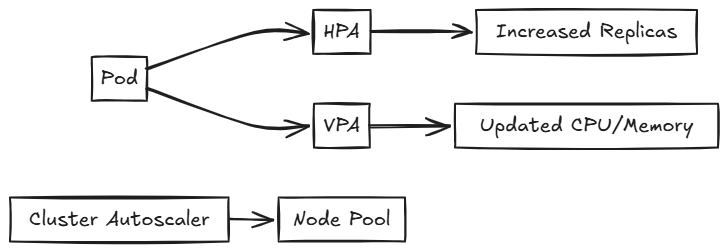
Autoscaling in Kubernetes adjusts the number of running objects based on resource utilization, availability, and requirements. There are several types of autoscalers:
Horizontal Pod Autoscaler (HPA)
HPA automatically scales the number of pod replicas based on CPU utilization or other select metrics.
kubectl autoscale deploy myapp --min=2 --max=10 --cpu-percent=80Vertical Pod Autoscaler (VPA)
VPA adjusts the CPU and memory requests and limits for containers based on usage. It helps optimize resource allocation for individual pods.
Cluster Autoscaler
The Cluster Autoscaler adjusts the number of nodes in your cluster when pods fail to launch due to insufficient resources or when nodes in the cluster are underutilized. In Azure Kubernetes Service (AKS), it’s recommended to let the Kubernetes Cluster Autoscaler manage the required scale settings.
Job Scheduling
Jobs
A Job creates one or more Pods to perform a specific task and ensures that the specified number of Pods successfully terminate. Jobs are useful for batch processing tasks.
Configuration Options:
- parallelism: Number of Pods to run in parallel.
- completions: Number of successful completions needed.
- activeDeadlineSeconds: Duration in seconds the Job may be active.
- backoffLimit: Number of retries before marking the Job as failed.
- ttlSecondsAfterFinished: Time to retain the Job after completion.
Example:
apiVersion: batch/v1
kind: Job
metadata:
  name: data-cleanup
spec:
  template:
    spec:
      containers:
      - name: cleaner
        image: busybox
        command: ["sh", "-c", "cleanup.sh"]
      restartPolicy: Never
  backoffLimit: 4
CronJobs
CronJobs schedule Jobs to run periodically at fixed times, dates, or intervals. They are useful for recurring tasks like backups or report generation .
Configuration Options:
- schedule: Cron format schedule string.
- startingDeadlineSeconds: Deadline in seconds for starting the Job if it misses its scheduled time.
- concurrencyPolicy: Specifies how to treat concurrent executions.
Example:
apiVersion: batch/v1
kind: CronJob
metadata:
  name: db-backup
spec:
  schedule: "0 1 * * *"
  jobTemplate:
    spec:
      template:
        spec:
          containers:
          - name: backup
            image: backup-tool
          restartPolicy: OnFailure
StatefulSets
StatefulSets manage the deployment and scaling of Pods with unique, persistent identities. Unlike Deployments, StatefulSets guarantee the ordering and uniqueness of Pods, making them ideal for stateful workloads.
Key Features
- Persistent storage: Each Pod in a StatefulSet gets its own PersistentVolume. This volume is retained across Pod restarts or rescheduling.
- Stable network identity: Each Pod receives a unique and consistent DNS name, allowing predictable network communication (for example,
pod-0.service-name). - Ordered operations: Pods are created, updated, and deleted in a defined order, one at a time. This ensures safe startup, updates, and shutdowns.
Real-World Example
Use StatefulSets to deploy clustered databases or distributed systems where each node must retain its identity and storage.
Use Case: Cassandra or Redis Clusters
In a Cassandra cluster:
- Each node (Pod) requires a stable hostname for cluster gossip protocol.
- Each node needs its own storage volume to persist data across rescheduling.
apiVersion: apps/v1
kind: StatefulSet
metadata:
  name: redis
spec:
  serviceName: "redis"
  replicas: 3
  selector:
    matchLabels:
      app: redis
  template:
    metadata:
      labels:
        app: redis
    spec:
      containers:
        - name: redis
          image: redis:7.0
          volumeMounts:
            - name: redis-data
              mountPath: /data
  volumeClaimTemplates:
    - metadata:
        name: redis-data
      spec:
        accessModes: [ "ReadWriteOnce" ]
        resources:
          requests:
            storage: 1Gi
Custom Resources
Custom Resources are user-defined API objects that allow you to store and retrieve structured data in Kubernetes. Combined with controllers, they help automate custom workflows or represent external systems inside your cluster.
Custom Resource Definitions (CRDs)
CRDs are the most common way to add custom resources. They allow you to define custom objects without modifying the Kubernetes source code .
apiVersion: apiextensions.k8s.io/v1
kind: CustomResourceDefinition
metadata:
name: databases.example.com
spec:
group: example.com
versions:
- name: v1
served: true
storage: true
schema:
openAPIV3Schema:
type: object
properties:
spec:
type: object
properties:
engine:
type: string
scope: Namespaced
names:
plural: databases
singular: database
kind: Database
shortNames:
- db
Once registered, you can create resources like:
apiVersion: example.com/v1
kind: Database
metadata:
name: my-postgres-db
spec:
engine: postgres
Use a CRD to manage custom services like Database, Cache, or Queue, with a controller automating provisioning tasks across your infrastructure.
API Aggregation
API Aggregation is an advanced extension mechanism. It lets you run a separate API server behind the Kubernetes API, delegating requests to custom endpoints.
- Your API server must implement Kubernetes-style authentication, authorization, and admission control.
- You write and deploy your own API server.
This method is more complex but offers greater flexibility.
Security Contexts
Security Contexts define privilege and access controls for Pods and containers. You can use them to enforce non-root execution, set file system permissions, and limit privilege escalation.
Example: Secure Pod Configuration
apiVersion: v1
kind: Pod
metadata:
  name: secure-pod
spec:
  securityContext:
    runAsUser: 1000       # Runs Pod as non-root user
    fsGroup: 2000         # Shared file system group
  containers:
  - name: app
    image: busybox
    securityContext:
      allowPrivilegeEscalation: false  # Prevents gaining extra privileges
Note: Always run containers as a non-root user unless absolutely necessary.
Pod Security Admission
Pod Security Admission (PSA) is a built-in admission controller in Kubernetes. It enforces security standards at the namespace level by applying predefined policies.
- Restricted: Strictest, enforces non-root and drops capabilities.
- Baseline: Reasonably secure defaults.
- Privileged: Allows full capabilities—use with caution.
Example: Enable Restricted Policy
kubectl label namespace my-namespace \
  pod-security.kubernetes.io/enforce=restricted
Network Policies
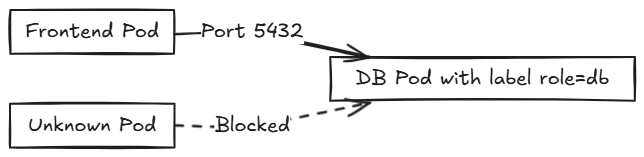
Network Policies control traffic flow to and from Pods. By default, all traffic is allowed unless restricted by a policy.
Example: Allow Only Frontend to Access Database
apiVersion: networking.k8s.io/v1
kind: NetworkPolicy
metadata:
  name: allow-frontend
spec:
  podSelector:
    matchLabels:
      role: db
  ingress:
  - from:
    - podSelector:
        matchLabels:
          role: frontend
    ports:
    - port: 5432
Combine multiple policies to fine-tune network security for microservices.
Metrics Server
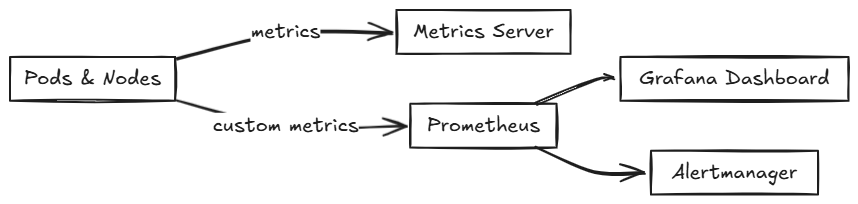
The Metrics Server is a lightweight resource monitoring component. It provides CPU and memory usage data for Pods and nodes.
Example Commands:
kubectl top pods
kubectl top nodes
Prometheus
Prometheus is a robust monitoring tool that collects and queries time-series metrics.
- Scrapes metrics from applications and Kubernetes components.
- Supports alerting and visualizations via Grafana.
Example Use Case:
Monitor HTTP request rates and latency in a web application. Integrate alerts when request rates spike or response times degrade.
Helm: Kubernetes Package Manager
Helm is the de facto package manager for Kubernetes. It enables developers to deploy and manage complex applications using templated YAML files—called charts—that follow DRY (Don’t Repeat Yourself) principles.
Package and deploy complex applications like WordPress, NGINX Ingress, or custom APIs using reusable charts. A chart includes:
- Template files for resource definitions
- Configuration values
- Metadata (e.g., chart name, version)
Charts can be stored in repositories—similar to how .deb or .rpm packages are stored for Linux distributions—or in container registries.
Key Benefits
- Reusable templates: Use Helm charts to define, install, and upgrade Kubernetes applications.
- Version control: Roll back to previous releases with a single command.
- GitOps friendly: Integrates well with tools like Argo CD and Flux for continuous delivery.
How Helm Works
Helm is a command-line tool that runs alongside kubectl and uses your existing kubeconfig file to connect securely to your cluster. It performs the following actions:
- Searches chart repositories based on your criteria.
- Downloads the selected chart to your local system.
- Uses the Kubernetes API to deploy the resources defined in the chart.
You can also use Helm to upgrade or delete deployments.
Benefits:
- DRY deployment configs
- Easy upgrades/rollbacks
- Integrates with GitOps workflows
Service Mesh: Advanced Service Communication
A service mesh abstracts communication between microservices into a dedicated infrastructure layer. It helps manage:
- Secure communication: Enforces mutual TLS (mTLS) between Pods.
- Advanced traffic routing: Supports strategies like canary releases and A/B testing.
- Observability: Collects traffic metrics, latency data, and failure insights without modifying app code.
Architecture Overview
Each Pod includes a sidecar proxy that handles communication and policy enforcement. These proxies form the data plane, while a central control plane manages configuration and telemetry.
- Data Plane: Handles service traffic. This usually includes sidecar proxies injected into each Pod, or node-level proxies in some implementations.
- Control Plane: Manages configuration, service discovery, policy enforcement, and telemetry.
The sidecar proxy intercepts all inbound and outbound traffic to the Pod, enabling consistent policy enforcement and observability without modifying the application code.
Decoupling of networking logic from application code
Popular Service Meshes
| Name | Notable Feature |
|---|---|
| Istio | Full-featured, widely adopted |
| Linkerd | Lightweight and CNCF-supported |
Next steps
For more information, refer to:
- Getting started with minikube.
- Introduction to Container Images and Orchestration.
- Managing Configuration with ConfigMaps and Secrets.

 Programmer Prodigy
2 thoughts on “A Developer’s Guide to Kubernetes Components”