Managing application configuration is essential for building scalable and secure Kubernetes deployments. Kubernetes provides native objects like ConfigMaps and Secrets to externalize configuration data and sensitive credentials from your application code. This separation supports better security practices, portability, and easier updates.
In this guide, you’ll learn how to manage configuration with ConfigMaps and Secrets, understand how they integrate with Pods, and apply best practices for real-world usage. You’ll also explore supporting components like Volumes, the Container Storage Interface (CSI), PersistentVolumes (PVs), and PersistentVolumeClaims (PVCs), which are critical for managing stateful workloads.
Volumes
Containers in Pods are ephemeral. When a container restarts, all data stored inside it is lost. To preserve data, Kubernetes uses Volumes—storage abstractions that support various backends.
In Kubernetes, an ephemeral Volume is linked to a Pod and can be shared among the containers of that Pod. Although the ephemeral Volume has the same life span as the Pod, meaning that it is deleted together with the Pod, the ephemeral Volume outlives the containers of the Pod – this allows data to be preserved across container restarts.
A volume plugin built using a standardized Container Storage Interface (CSI) designed to work on different container orchestrators with a variety of storage providers.
Ephemeral Volume Types
A directory which is mounted inside a Pod is backed by the underlying Volume Type. A Volume Type decides the properties of the directory, like size, content, default access modes, etc. Some examples of Volume Types that support ephemeral Volumes are:
| Volume type | Description |
|---|---|
emptyDir | Temporary storage created when a Pod is scheduled to a node. Deleted when the Pod is removed. |
hostPath | Mounts a file or directory from the host node. Data persists after Pod deletion. |
secret | Injects sensitive data such as tokens and passwords into containers. |
configMap | Provides configuration data as files or environment variables. |
nfs, iscsi | Mounts external shared file systems or block devices. |
cephfs | Mounts CephFS volumes. Data persists after the Pod is deleted. |
gcePersistentDisk, awsElasticBlockStore, azureDisk, azureFile | Mounts disks or file shares from cloud providers. |
Persistent Storage in Kubernetes
To manage long-term storage, Kubernetes provides the PersistentVolume (PV) subsystem. This separates storage provisioning (by admins) from storage consumption (by developers).
PersistentVolumes
To manage the Volume, it uses the PersistentVolume API resource type, and to consume it, it uses the PersistentVolumeClaim API resource type.
A PersistentVolume is a cluster-managed storage resource. It abstracts storage backends such as:
- Local disk
- NFS
- Cloud block/file storage (e.g., GCEPersistentDisk, AWSElasticBlockStore)
- Distributed storage (e.g., CephFS)

PersistentVolumes can be:
- Statically provisioned by administrators
- Dynamically provisioned using a
StorageClass
PersistentVolumeClaims
A PersistentVolumeClaim is a developer request for storage. You specify:
- Access mode
- Size
- Volume mode (Filesystem or Block)
- StorageClass
| Mode | Description |
|---|---|
ReadWriteOnce | One node can read and write |
ReadOnlyMany | Many nodes can read |
ReadWriteMany | Many nodes can read and write |
ReadWriteOncePod | One Pod can read and write (Kubernetes 1.22+) |
Kubernetes binds the claim to a suitable PersistentVolume automatically.

Storage Reclaim Policies
When a PVC is released, Kubernetes follows the PV’s reclaim policy:
| Policy | Behavior |
|---|---|
Retain | Keeps the volume and data. Manual cleanup is required. |
Delete | Deletes the volume and its data. |
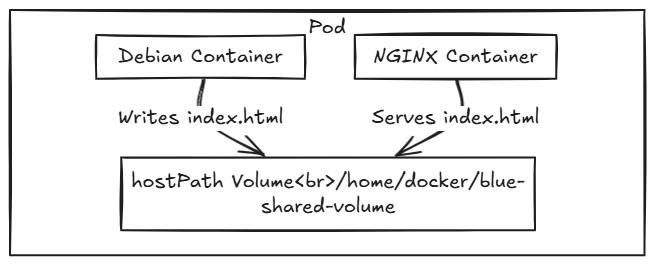
In this example, two containers run in the same Pod:
- A Debian container writes a welcome message to a shared directory.
- An NGINX container serves that file as a web page.
YAML Configuration
apiVersion: apps/v1
kind: Deployment
metadata:
  name: blue-app
spec:
  replicas: 1
  selector:
    matchLabels:
      app: blue-app
  template:
    metadata:
      labels:
        app: blue-app
        type: canary
    spec:
      volumes:
        - name: host-volume
          hostPath:
            path: /home/docker/blue-shared-volume
      containers:
        - name: nginx
          image: nginx
          ports:
            - containerPort: 80
          volumeMounts:
            - mountPath: /usr/share/nginx/html
              name: host-volume
        - name: debian
          image: debian
          command: ["/bin/sh", "-c", "echo Welcome to BLUE App! > /host-vol/index.html ; sleep infinity"]
          volumeMounts:
            - mountPath: /host-vol
              name: host-volume
ConfigMaps
A ConfigMap lets you externalize configuration from container images. You can pass configuration data to Pods using key-value pairs. These values can be exposed as:
- Environment variables
- Command-line arguments
- Mounted volumes
You can create a ConfigMap from literal values, configuration files, or a manifest.
Create a ConfigMap from Literal Values
Use the kubectl create configmap command to define key-value pairs directly.
kubectl create configmap my-config \
--from-literal=key1=value1 \
--from-literal=key2=value2
Verify the ConfigMap:
kubectl get configmaps my-config -o yamlThe -o yaml flag outputs the object in YAML format. The data field lists key-value pairs. Metadata includes the name and other configuration details.
Create a ConfigMap from a Manifest
You can use a declarative approach by defining a ConfigMap in a YAML manifest.
File: customer1-configmap.yaml
apiVersion: v1
kind: ConfigMap
metadata:
name: customer1
data:
TEXT1: Customer1_Company
TEXT2: Welcomes You
COMPANY: Customer1 Company Technology Pct. Ltd.
Create the ConfigMap:
kubectl create -f customer1-configmap.yamlCreate a ConfigMap from a File
You can generate a ConfigMap from a file that contains configuration values.
File: permission-reset.properties
permission=read-only
allowed="true"
resetCount=3
Create the ConfigMap:
kubectl create configmap permission-config \ --from-file=path/to/permission-reset.propertiesUse ConfigMaps in Pods
You can use ConfigMap data in a Pod as environment variables.
Load All Keys as Environment Variables
containers:
- name: myapp-full-container
  image: myapp
  envFrom:
  - configMapRef:
      name: full-config-map
Load Specific Keys as Environment Variables
containers:
- name: myapp-specific-container
  image: myapp
  env:
  - name: SPECIFIC_ENV_VAR1
    valueFrom:
      configMapKeyRef:
        name: config-map-1
        key: SPECIFIC_DATA
  - name: SPECIFIC_ENV_VAR2
    valueFrom:
      configMapKeyRef:
        name: config-map-2
        key: SPECIFIC_INFO
Secrets
Kubernetes Secrets let you store and manage sensitive information—such as passwords, tokens, and SSH keys—separately from your application code. Secrets work like ConfigMaps but are designed specifically for confidential data and help reduce the risk of accidental exposure.
Note: By default, Secret data is stored as plain text in etcd. Protect it by restricting access to the API server and enabling encryption at rest.
You can create Secrets using literal values, YAML manifests, or files. Kubernetes stores Secret data as key-value pairs.
Create a Secret from Literal Values
Use the following command to create a Secret from a string literal:
kubectl create secret generic my-password \--from-literal=password=mysqlpasswordTo inspect the Secret:
kubectl get secret my-password
kubectl describe secret my-password
Create a Secret from a Manifest File
You can define Secrets in YAML using either base64-encoded data or raw stringData. Kubernetes encodes stringData automatically.
Option 1: Use data (Base64-encoded)
First, encode the value:
echo -n 'mysqlpassword' | base64Then create the manifest file mypass.yaml:
apiVersion: v1
kind: Secret
metadata:
  name: my-password
type: Opaque
data:
  password: bXlzcWxwYXNzd29yZA==
Apply the manifest:
kubectl apply -f mypass.yamlNote: Base64 encoding is not encryption. Avoid committing this file to version control.
Option 2: Use stringData (Plain text)
apiVersion: v1
kind: Secret
metadata:
  name: my-password
type: Opaque
stringData:
  password: mysqlpassword
Apply the manifest:
kubectl apply -f mypass.yamlCreate a Secret from a File
To create a Secret from a file, first create the file:
echo -n 'mysqlpassword' > password.txtThen run:
kubectl create secret generic my-file-password \--from-file=password.txtInspect the Secret:
kubectl get secret my-file-password
kubectl describe secret my-file-password
Use Secrets in Pods
You can inject Secrets into Pods using environment variables or mount them as volumes.
Option 1: Use Secrets as Environment Variables
Reference a specific key from the Secret:
containers:
- name: wordpress
  image: wordpress:4.7.3-apache
  env:
  - name: WORDPRESS_DB_PASSWORD
    valueFrom:
      secretKeyRef:
        name: my-password
        key: password
Option 2: Mount Secrets as Volumes
Mount the entire Secret. Each key becomes a file with the Secret value as its content.
containers:
- name: wordpress
  image: wordpress:4.7.3-apache
  volumeMounts:
  - name: secret-volume
    mountPath: "/etc/secret-data"
    readOnly: true

volumes:
- name: secret-volume
  secret:
    secretName: my-password
Best Practices for Using Secrets
- Avoid hardcoding Secrets in application manifests.
- Never commit Secrets to version control systems.
- Enable encryption at rest for etcd in production clusters.
- Use RBAC to control access to Secrets.

 Programmer Prodigy
2 thoughts on “Managing Configuration with ConfigMaps and Secrets”